A cron expression is a five-field string that tells a cron daemon when to execute a scheduled task.
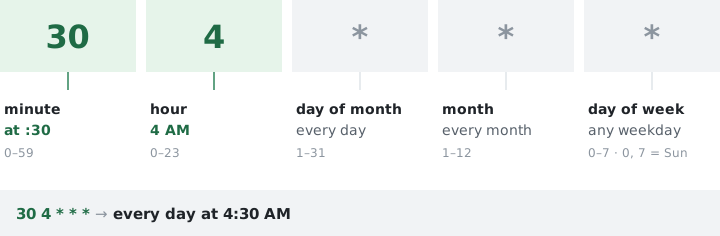
Five fields, left to right: minute (0-59), hour (0-23), day of month (1-31), month (1-12), day of week (0-7, where 0 and 7 both mean Sunday). The syntax dates back to Version 7 Unix in 1979 and hasn't changed much since. 30 4 * * * means "run at 4:30 AM every day." 0 9 * * 1-5 means "9 AM on weekdays." That's the whole idea.
The five fields explained#
Every cron expression reads left to right. The first field is the most granular (minute), and the last is the broadest (day of week). Get the order wrong and a job that should run once a day at 2 AM fires once an hour at the second minute instead. I've made that mistake on a production server. The log file hit 400 MB before anyone noticed.
| Position | Field | Allowed values | Example | Meaning |
|---|---|---|---|---|
| 1st | Minute | 0-59 | 30 | At the 30th minute |
| 2nd | Hour | 0-23 | 4 | 4 AM (24-hour clock) |
| 3rd | Day of month | 1-31 | 15 | The 15th of the month |
| 4th | Month | 1-12 or JAN-DEC | 6 | June |
| 5th | Day of week | 0-7 or SUN-SAT | 1 | Monday |
Months start at 1, not 0. Days of the week start at 0 for Sunday. Both 0 and 7 mean Sunday on most systems, though some older implementations only accept 0. Three-letter names (MON, JAN) work on many systems but numeric values are more portable across platforms.
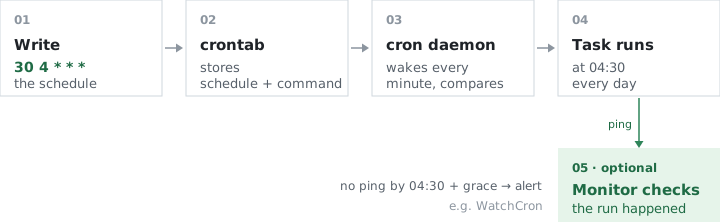
The command itself comes after the five fields in a crontab line: 30 4 * * * /path/to/script.sh. In systems like Kubernetes CronJobs or WatchCron Cloud Cron, the expression stands alone and the action is configured separately.
Special characters#
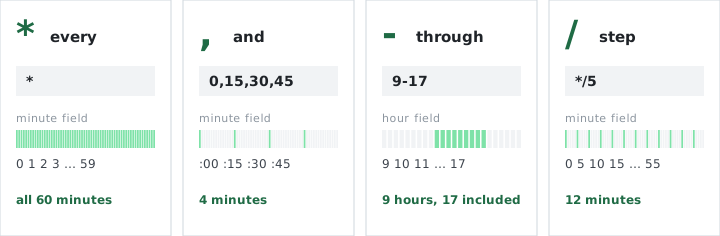
Four characters handle nearly every scheduling pattern. A fifth (?) shows up in extended implementations.
| Character | Name | What it does | Example | Result |
|---|---|---|---|---|
* | Asterisk | Matches every value in the field | * * * * * | Every minute |
/ | Slash (step) | Every Nth value | */15 * * * * | Every 15 minutes (0, 15, 30, 45) |
- | Hyphen (range) | Consecutive values | 0 9-17 * * * | Top of every hour, 9 AM through 5 PM |
, | Comma (list) | Specific values | 0 9,13,18 * * * | At 9 AM, 1 PM, and 6 PM |
? | Question mark | "No specific value" (Quartz, AWS only) | 0 0 ? * MON | Midnight every Monday |
You can combine them. 10-30/5 in the minute field fires at minutes 10, 15, 20, 25, and 30. 1,15 * * * * fires at minute 1 and minute 15 of every hour. But watch out for step values on ranges that don't divide evenly: */7 in the minute field produces 0, 7, 14, 21, 28, 35, 42, 49, 56. The gap between 56 and the next hour's 0 is only 4 minutes, not 7. The step resets at field boundaries.
Common cron expressions#
These cover the schedules that come up in most server environments. For 25+ additional patterns with real-world context, see the cron expression cheat sheet.
| Expression | Schedule |
|---|---|
* * * * * | Every minute |
*/5 * * * * | Every 5 minutes |
*/10 * * * * | Every 10 minutes |
*/30 * * * * | Every 30 minutes |
0 * * * * | Every hour at :00 |
0 */2 * * * | Every 2 hours |
0 0 * * * | Every day at midnight |
0 2 * * * | Every day at 2 AM |
0 9 * * 1-5 | Weekdays at 9 AM |
0 0 * * 0 | Sunday at midnight |
0 0 * * 1 | Monday at midnight |
0 0 1 * * | First day of every month |
0 0 1 1 * | January 1st at midnight |
0 0 1 */3 * | Quarterly (1st of every 3rd month) |
0 3 * * * | Every day at 3 AM |
Use the cron expression validator to check any expression before deploying it. One misplaced field turns a daily job into a per-minute one.
Shorthand strings (@macros)#
Most cron implementations support shorthand aliases that map to standard five-field expressions. They're convenient, though not every platform accepts them.
| Shorthand | Equivalent expression | Schedule |
|---|---|---|
@yearly / @annually | 0 0 1 1 * | January 1st at midnight |
@monthly | 0 0 1 * * | 1st of every month at midnight |
@weekly | 0 0 * * 0 | Sunday at midnight |
@daily / @midnight | 0 0 * * * | Every day at midnight |
@hourly | 0 * * * * | Every hour at :00 |
@reboot | n/a | Once at daemon startup |
@reboot has no five-field equivalent because it doesn't describe a recurring schedule. It fires once when the cron daemon starts, which typically means after a system reboot. Kubernetes CronJobs and Docker don't support @reboot at all. GitHub Actions and AWS EventBridge ignore all shorthand strings. When portability matters, write the full expression.
The OR rule that trips everyone up#
Two fields cause most of the confusion, and both involve days. When day-of-month and day-of-week are both restricted (neither is *), standard cron treats them as OR. So 0 0 15 * 1 doesn't mean "the 15th, but only if it's a Monday." It means every 15th and every Monday. That's roughly 67 runs per year instead of 12. We've watched teams debug this for hours before realizing the schedule was doing exactly what it was told.
Step values on uneven ranges also catch people off guard. 0 0 1-30/7 * * fires on the 1st, 8th, 15th, 22nd, and 29th. Five times, not four (the range doesn't divide evenly by seven). The expression validator catches these misreads before deployment, and the visual builder skips the mental arithmetic entirely.
Common mistakes#
Three patterns account for most cron debugging sessions.
Wrong field order. The expression 0 0 * * * runs at midnight. Swap the first two fields to 0 * 0 * * and cron rejects it (day 0 doesn't exist) or interprets it in ways you didn't intend. Minute always comes first. If you're second-guessing the order, the builder tool removes the ambiguity.
The midnight stampede. Setting every daily job to 0 0 * * * stacks them all at midnight. If three of those jobs hit the same database, the first one might take 90 seconds instead of 15. Stagger start times: backups at 2 AM, reports at 2:30, cleanups at 3:00. I've personally triaged a production incident caused by exactly this. The site became unresponsive because four large queries collided at midnight, and the connection pool ran dry.
Assuming AND when cron means OR. Covered above, but it's worth repeating because it generates the most confused support tickets. 0 0 1 * 5 fires on the 1st of every month and every Friday. That's roughly 56 runs a year. If you wanted "the first Friday of every month," cron can't express that natively. Use 0 0 1-7 * * and add a weekday check inside the script: [ "$(date +\%u)" = 5 ] && /path/to/job.sh.
Not all cron is the same cron#
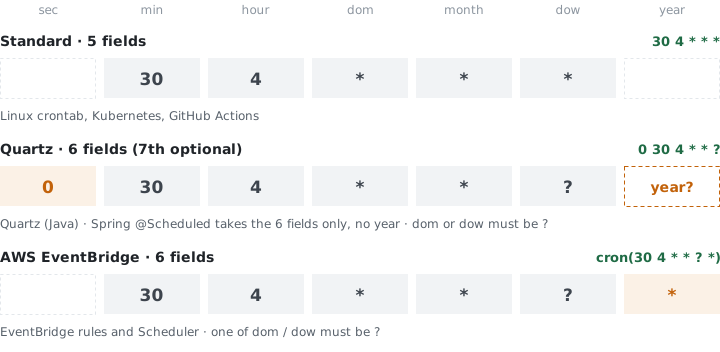
The five-field format is standard on Linux, macOS, and most Unix systems. But implementations diverge once you leave that baseline.
| Platform | Fields | Extra features | Timezone |
|---|---|---|---|
| Linux crontab | 5 | @daily, @reboot | System TZ or CRON_TZ |
| Quartz (Java) | 6-7 (adds seconds, optional year) | L, W, #, ? | Configurable per trigger |
| Kubernetes CronJob | 5 | timeZone field (v1.27+) | UTC default |
| AWS EventBridge | 6 (adds year) | L, W, ? | UTC only |
| GitHub Actions | 5 | No shorthand | UTC only |
| systemd timers | Different syntax | OnCalendar=*-*-01 02:00:00 | System TZ |
| Laravel | Fluent API | ->dailyAt('04:30') → 30 4 * * * | App TZ |
Quartz adds L (last day of month), W (nearest weekday), and # (Nth weekday: MON#1 = first Monday). These don't exist in standard cron. If you're copying an expression from a Quartz tutorial into a crontab, the extra field or special characters will cause a silent failure or a cryptic parse error. The timezone converter helps when migrating expressions between platforms that handle timezones differently.
Monitoring needs the expression#
A cron monitor parses the expression to know when a job should've run. Without it, the monitor can only do heartbeat checks ("expect a ping every 5 minutes"), which can't distinguish between a job scheduled for 4:30 AM that fired at 4:30 AM and one that silently skipped. WatchCron takes the full expression, calculates the next expected run, adds a grace period for drift, and alerts you if the window closes empty. The cron calculator shows how many times an expression fires per day, week, and year, so you can verify the math before wiring up the monitor.
This is where the five-field syntax earns its keep. A monitoring system that understands 0 3 * * 1 knows the job runs at 3 AM on Mondays. It won't send false alarms on Tuesday or flag a 90-second delay as a missed run. Expression-aware monitoring reduces noise by an order of magnitude compared to fixed-interval heartbeats. Healthchecks.io and Cronitor both parse cron expressions natively. Better Stack uses interval-based detection, which works for regular schedules but generates false positives on irregular ones (first-of-month, bi-weekly).
See our cron expression cheat sheet for 25+ copy-paste examples, or browse 400+ cron expression examples by category.
Related terms: cron job, timeout, health check, SLA, runbook