
Most monitoring tools are built by companies you've never heard of. Oh Dear is different. It comes from Freek Van der Herten and Mattias Geniar, names the Laravel community knows well. That pedigree shows: Oh Dear has checks that most competitors skip entirely, like broken link crawling, mixed content detection, and application health endpoints. WatchCron takes a different approach: broader monitoring coverage (cron jobs, ports, blocklists, SSL, domains, uptime) on flat plans with a free tier. Both tools are opinionated about what matters. If you're evaluating an Oh Dear alternative, or comparing the two side by side, this page helps you figure out which opinion matches your stack.
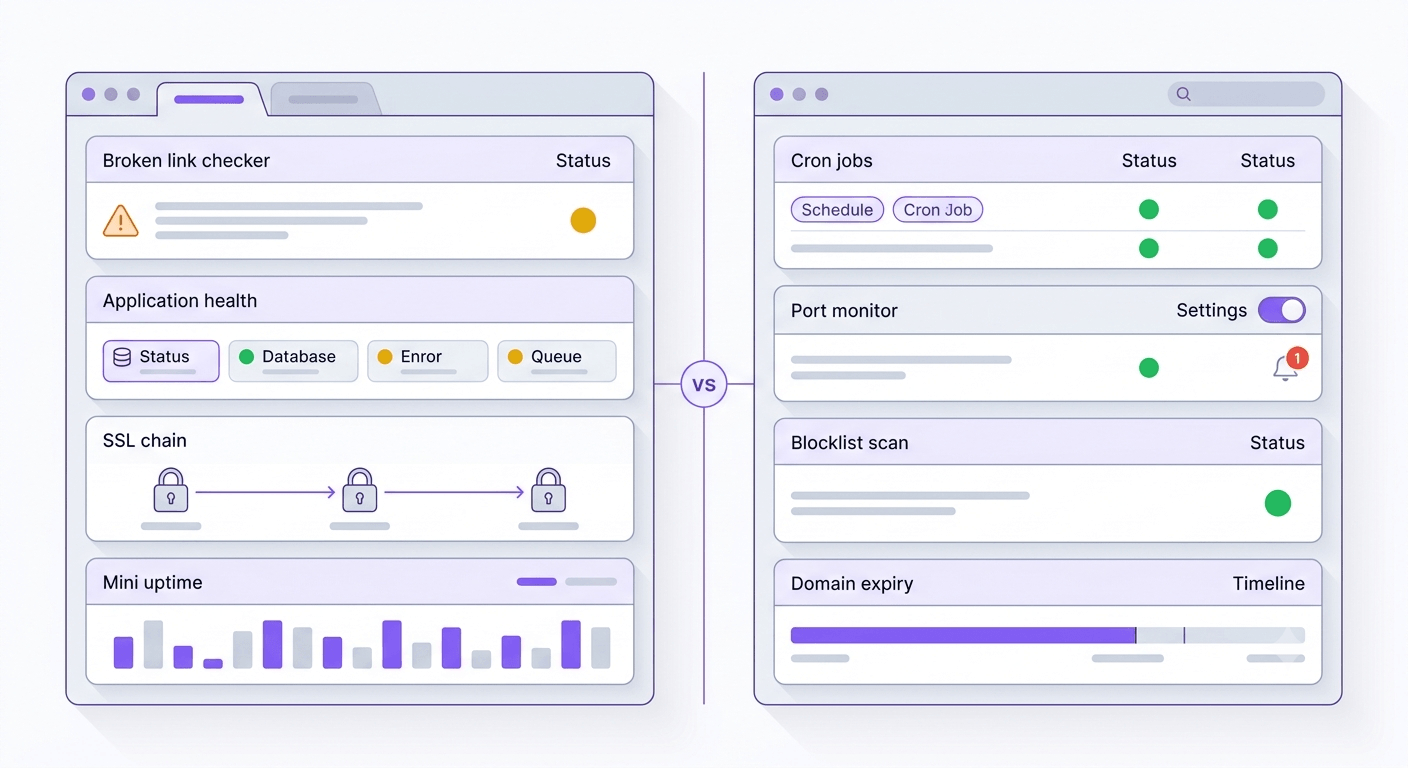
Feature comparison: monitoring types and tooling
| Capability | WatchCron | Oh Dear |
|---|---|---|
| HTTP / uptime monitoring | Yes | Yes (multi-location verification) |
| Cron / heartbeat monitoring | Yes (all plans incl. free) | Yes (all plans) |
| Port monitoring | Yes (TCP, UDP, DNS, ICMP) | TCP only (all 65,535 ports every 12h) |
| SSL certificate monitoring | Leaf certificate | Full chain (leaf + intermediates, revocation, change history) |
| Domain expiration monitoring | Yes (WHOIS-based) | Yes (RDAP-based, some TLDs missing) |
| Blocklist / DNSBL monitoring | Yes | Yes (11 lists incl. security + content filters) |
| Broken links detection | No | Yes (full site crawl) |
| Mixed content detection | No | Yes (HTTP on HTTPS pages) |
| Application health monitoring | No | Yes (JSON health endpoint) |
| DNS monitoring | No | Yes (all record types, all nameservers) |
| Performance / Lighthouse | No | Yes (performance budgets) |
| Public status pages | Yes (included) | Yes (unlimited, custom domain) |
| Incident management | Yes (standalone workflow) | Tied to status pages |
| Notification channels | 10 | 12 |
| Voice call alerts | Yes (Business plan) | No |
| SMS alerts | Included from Pro ($19/mo) | Included on all plans |
| PDF & CSV reports | Yes | Monthly email reports only |
| Free plan | Yes (20 checks) | No (10-day trial) |
| Team members | 1 / 3 / 10 / unlimited by plan | Unlimited on all plans |
| API | Yes | Yes (all plans) |
Where Oh Dear is the stronger choice
Oh Dear has checks that almost nobody else offers. Broken link detection crawls your entire site and reports every 404, pages that return a status code your users shouldn't see. Most monitoring tools check a single URL; Oh Dear follows internal links and maps the whole domain. If you run a content-heavy site where broken links accumulate as pages get moved or deleted, this is a real differentiator.
Mixed content detection catches HTTP resources loaded on HTTPS pages: images, scripts, fonts served over an insecure connection. Browsers flag these, and they can break functionality silently. WatchCron doesn't scan page content this way; our SSL monitoring checks the certificate itself, not what the page loads.
Application health monitoring is the most developer-oriented feature in Oh Dear's lineup. Your app exposes a JSON endpoint that reports the status of internal components (database connections, Redis availability, disk space, queue health, scheduler status). Oh Dear polls it every minute and alerts when any component reports unhealthy. For Laravel apps, Spatie's laravel-health package makes setup trivial: a Composer install and a few lines of config. WatchCron can tell you if your site is reachable; Oh Dear can tell you if your queue worker is stuck.
SSL certificate monitoring goes deeper than what most tools offer. Oh Dear checks the entire certificate chain (leaf certificate, intermediates, root) and flags issues like deprecated algorithms, revoked certificates, or unexpected chain changes. When your certificate changes, Oh Dear stores before-and-after snapshots so you can see exactly what shifted. WatchCron monitors certificate expiration, but doesn't inspect the intermediate chain or track change history.
DNS monitoring watches all record types across all authoritative nameservers, detecting unauthorized changes or inconsistencies between nameservers. If someone modifies your MX record without telling ops, Oh Dear catches it. WatchCron doesn't have standalone DNS monitoring.
Oh Dear also includes unlimited team members on every plan, 10 notification channels (including Google Chat, Pushover, and ntfy alongside the standard Slack/Discord/Telegram/Teams), and unlimited status pages with custom domains. The pricing is straightforward: every feature on every plan, with the only variable being how many sites you monitor.
Where WatchCron covers ground Oh Dear doesn't
The most tangible gap is the free tier. Oh Dear offers a 10-day trial with a 30-day money-back guarantee, but no permanent free plan. WatchCron gives you 20 cron checks with email and webhook alerts. No time limit, no credit card, no commercial-use restrictions. If you're a solo developer monitoring a couple of side projects, WatchCron costs nothing. Oh Dear starts at $15/month.
Port monitoring is more established on WatchCron. Oh Dear scans all 65,535 TCP ports every 12 hours, useful for security (detecting unexpected open ports) but not for real-time availability monitoring. WatchCron's port monitors check specific ports on your schedule (down to every minute) with protocol-level support for TCP, UDP, DNS, and ICMP. If you need to know within minutes that your SMTP port stopped responding, WatchCron handles that; Oh Dear's 12-hour scan window is too slow.
Voice call alerts don't exist in Oh Dear. SMS is their most urgent channel. WatchCron's Business plan ($49/month) includes native voice calls. If your payment gateway goes down at 3 AM and your on-call engineer has their phone on silent, a phone call gets through where an SMS notification might not.
Incident management works differently on each platform. Oh Dear ties incidents to status pages. You can post updates, but the incident workflow lives inside the status page context. WatchCron runs incidents independently: create an incident, post timestamped updates (investigating → identified → monitoring → resolved), and notify status page subscribers, whether or not you have a public status page set up.
Reporting is another gap. WatchCron generates uptime reports with PDF and CSV exports, shareable via public links. Oh Dear sends monthly automated email reports with uptime summaries, but doesn't offer downloadable report files for SLA reviews or client meetings.
Pricing: per-site tiers vs. per-check flat plans
This is where the two tools diverge most in philosophy. Oh Dear counts sites; WatchCron counts checks. Both approaches have trade-offs depending on what you monitor.
| WatchCron | Oh Dear | |
|---|---|---|
| Free tier | 20 cron checks, 1 member, email + webhooks | No (10-day trial + 30-day money-back) |
| Entry paid | Starter — $7/mo, 75 checks, 3 members | Mini — $15/mo, 5 sites, unlimited members |
| Mid-tier | Pro — $19/mo, 250 checks, 10 members | Standard — $27/mo, 10 sites, unlimited members |
| Upper tier | Business — $49/mo, 1,000 checks, unlimited members | Plus — $50/mo, 25 sites, unlimited members |
| High tier | — | Pro — $77/mo (50 sites), Enterprise — $146/mo (100 sites) |
| Port/domain monitors | Unlimited (don't count against limits) | Included per site |
| SMS alerts | Included from Pro ($19/mo) | Included on all plans |
| Voice alerts | Yes (Business) | No |
| Team members | 1 / 3 / 10 / unlimited | Unlimited on all plans |
| Status pages | Included | Unlimited, custom domains |
| Broken links / mixed content | No | Yes |
| Application health | No | Yes |
Oh Dear's SMS-on-all-plans approach is an advantage over WatchCron's structure, where SMS requires the Pro plan ($19/month). If SMS is critical to you and you're watching your budget, Oh Dear gives you that on the entry plan.
Oh Dear's unlimited team members and unlimited status pages on every plan are clear wins for agencies or teams where 5+ people need dashboard access. WatchCron gates team members by plan. You need Pro for 10 members or Business for unlimited.
The pricing math depends on how you structure your monitoring. Oh Dear counts sites. If you monitor 10 domains, you need the $27/month Standard plan regardless of how many checks each site has. WatchCron counts checks. If you have 3 domains but 100 cron jobs, 20 uptime checks, and 30 port monitors across them, you need enough checks to cover that. Port and domain monitors don't count against the limit, so the 100 cron + 20 uptime checks fit in the Pro plan at $19/month. Same 3 domains on Oh Dear's Mini plan would be $15/month with all features included.
Where each pricing model wins
Oh Dear is cheaper if you monitor many endpoints per site. Ten websites with all of Oh Dear's 11 check types per site costs $27/month (Standard plan). Every check type is included, no per-check billing.
WatchCron is cheaper if you have many scheduled tasks or monitor a lot of infrastructure. Twenty cron jobs, 10 uptime checks, and unlimited port monitors fit in the Pro plan at $19/month. On Oh Dear, those cron jobs and uptime checks still run under the site count, but you'd be paying for broken link crawling and mixed content detection you might not need.
For a solo developer with 2-3 projects, the biggest difference is that WatchCron has a free plan and Oh Dear doesn't. You can run 20 cron checks on WatchCron indefinitely at zero cost.
Pricing as of June 2026, from Oh Dear's public pricing page.
Oh Dear's Laravel integration vs WatchCron
Oh Dear's roots in the Laravel ecosystem show in ways that go beyond marketing. Spatie's laravel-health package integrates directly with Oh Dear's application health monitoring. You run a Composer install, define health checks (database, Redis, queue, disk, scheduler), and Oh Dear starts polling the JSON endpoint. The thenPingOhDear() method in Laravel's scheduler gives you cron monitoring with one line of code. For a Laravel team, the setup friction is close to zero.
WatchCron's cron monitoring uses the same ping-based model as Oh Dear: your task hits a URL on success, but setup requires copying a ping URL and adding a curl call. It's not hard, but it's not a one-liner in your scheduler either. WatchCron works with any language and framework; Oh Dear works with any language too, but the Laravel experience is distinctly smoother.
If your entire stack is Laravel and you want the tightest possible integration, Oh Dear has a clear edge. If your stack is mixed (Python workers, Node.js services, Go microservices alongside a Laravel app), the framework-specific integration matters less, and the comparison shifts to feature breadth and pricing.
Switching from Oh Dear to WatchCron
Both tools use HTTP polling for uptime and ping URLs for cron monitoring, so the migration is simple: no data export needed, just recreate your checks. If you're considering WatchCron as an Oh Dear alternative, here's the process.
- Create a WatchCron account and project. Sign up free: 20 cron checks, no card required.
- Recreate uptime monitors. For each Oh Dear site, create a WatchCron HTTP check with the same URL and interval.
- Migrate cron monitors. Replace Oh Dear's ping URLs in your crontab or scheduler with WatchCron ping URLs. If you were using
thenPingOhDear(), switch to a curl-based ping:curl -fsS -m 10 https://watchcron.com/ping/YOUR_UUID. - Add port and domain monitors. Set up port checks for any services you were monitoring. Add domain expiration and blocklist monitors: they're unlimited on every plan.
- Configure notification channels. Set up Slack, Telegram, Discord, email, or your team's preferred channels.
- Set up status pages and incidents. Recreate your status page and configure incident management if you use it.
What you'll lose in the switch: broken link detection, mixed content scanning, application health monitoring, DNS change tracking, and the deeper SSL certificate chain inspection. If those checks are part of your workflow, you'd need separate tools to replace them (Screaming Frog for broken links, a DNS monitoring tool for record tracking). What you'll gain: a free tier, voice call alerts, downloadable PDF reports, and flat per-check pricing without per-site limits.
WatchCron vs Oh Dear: which one fits?
Pick Oh Dear if you run a Laravel stack and want the tightest framework integration available, you need checks that go deeper than uptime and cron (broken links, mixed content, application health, full certificate chain analysis), or you manage an agency with many sites and need unlimited team members and status pages on every plan. Oh Dear is a well-built product, and the Oh Dear alternative search often comes from teams that need different coverage rather than a better tool.
Pick WatchCron if you want a free plan to start, broader monitoring types on flat pricing, voice call alerts for critical incidents, and port monitoring that checks every minute instead of every 12 hours. Ten notification channels, status pages, incident management, and PDF reports, all included. Cron monitors understand full cron expressions (not just intervals), show a "Next 5 runs" preview, and support maintenance windows. Acknowledge alerts directly from email, no login required. Cron monitors understand full cron expressions (not just intervals), show a "Next 5 runs" preview, and support maintenance windows. Acknowledge alerts directly from email, no login required. Port and domain monitors are unlimited on every plan.
Start monitoring for free
Seven monitor types, 10 alert channels, status pages, and incident management. Free, no credit card. Flat pricing from $7/month when your team grows.