
Five-minute guides are everywhere. Fifteen-minute guides too. Ten minutes barely gets mentioned — yet */10 * * * * divides the hour into six perfectly even slices, runs 144 times a day, and quietly handles the work that's too frequent for 15 and too infrequent for 5. Queue processing, health checks, metrics collection — the kind of tasks where freshness matters but per-minute polling is overkill.
Below: what cron every 10 minutes is built for, the expression breakdown, setup, pitfalls you won't find in the other interval guides, and variations worth knowing.
What 10-minute intervals solve
Ten minutes is the health-check sweet spot. Fast enough that stale data doesn't linger on dashboards, slow enough that you won't blow through API rate limits or pile up database connections. Common use cases:
- Endpoint health checks. Ping your app every 10 minutes and log the response. If something breaks, you know within 10 minutes — not an hour.
- Queue processing. Drain a job queue six times an hour. For most apps, that keeps the queue short without running a persistent worker.
- Metrics and log aggregation. Pull stats from your servers, compress them, push to a dashboard. At every 5 minutes the writes pile up; at every 15 the charts feel choppy.
- Feed and inventory syncs. Pull product data or RSS feeds from a supplier API often enough to stay current, rarely enough to respect their rate limits.
The expression: */10 * * * *
The */10 in the minute field means "starting from 0, fire every 10th minute." That gives you six runs per hour — at :00, :10, :20, :30, :40, and :50.
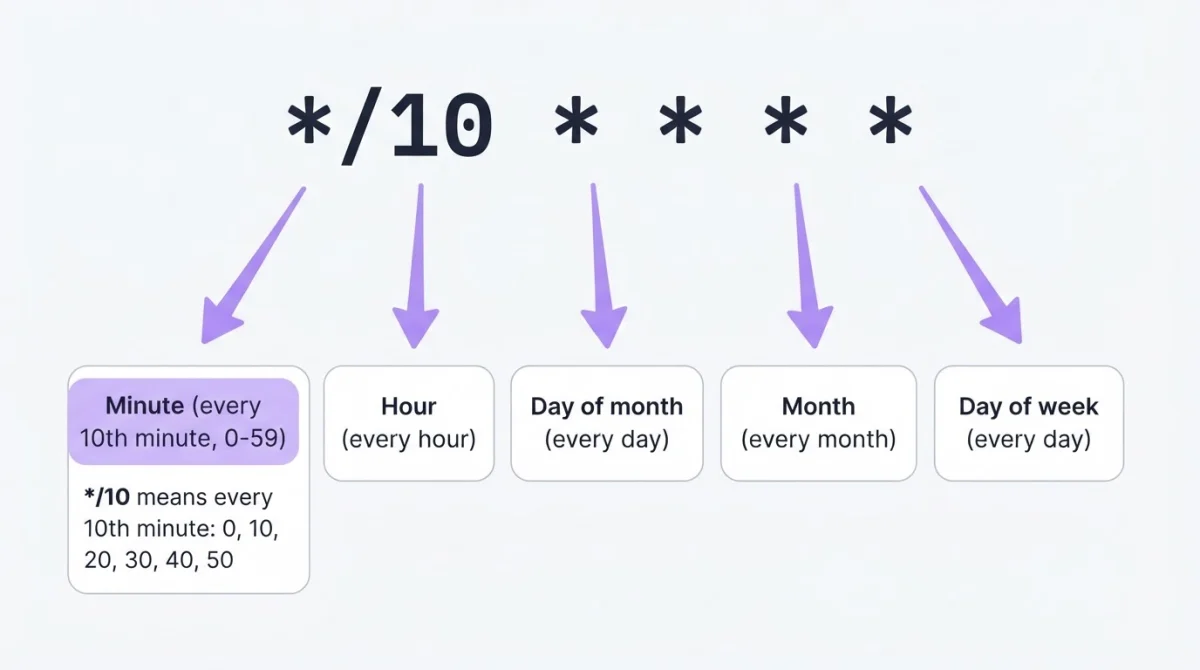
The long form — 0,10,20,30,40,50 * * * * — is equivalent but harder to scan. 10 divides 60 evenly, so the six runs are perfectly spaced. Compare that with */7, which gives you 0, 7, 14, 21, 28, 35, 42, 49, 56 — nine uneven runs with a 4-minute gap at the hour boundary. Build your expression visually if you want to experiment with other step values.
Setting it up
crontab -eAdd the entry with absolute paths:
*/10 * * * * /usr/bin/php /var/www/myapp/artisan queue:work --stop-when-empty >> /var/log/queue-cron.log 2>&1Confirm with crontab -l. Absolute paths matter — cron doesn't load your shell profile, so php alone won't resolve. The >> appends output to a log; without it, cron tries to email results and on most servers that goes nowhere.
Pitfalls
Rate limit math that worked at */15 breaks at */10. If your script makes 17 API calls per run, four runs per hour at */15 means 68 calls — fine under a 100/hour limit. Tighten to */10 and it's 6 × 17 = 102. Just barely over. You'll get 429 errors by Thursday and wonder what changed. Redo the math every time you change the interval.
10 * * * * is not */10 * * * *. Drop the step operator and you go from 144 runs a day to 24 — once per hour at minute 10 only. People strip the */ thinking it's cleaner and lose 83% of their runs.
Alert fatigue at 144 runs/day. If your health check fails and recovers, six failure alerts per hour adds up fast. At every 5 minutes people expect noise and set up dampening immediately. At */10 they assume it's calm enough — then get blasted with 30 alerts before lunch. Set a grace period or cooldown on your alerting, not just on the cron job itself.
The round-number trap. Ten feels like the natural step between 5 and 15, but sometimes the actual need is 12 minutes (5 runs/hour) or 20 minutes (3 runs/hour). Both */12 and */20 divide 60 evenly. Default to */10 because you ran the numbers, not because 10 is a round number.
Overlap on slow scripts. Ten minutes of headroom handles most tasks, but a heavy database export or a slow API crawl can exceed it. Lock it:
*/10 * * * * /usr/bin/flock -n /tmp/queue.lock /path/to/script.shVariations
Every 10 minutes during business hours:
*/10 9-17 * * 1-5 /path/to/script.shFires from 9:00 to 17:50, Monday through Friday — 54 runs per workday. Good for polling endpoints or syncing data that only matters during office hours.
Offset to avoid the :00 collision:
3,13,23,33,43,53 * * * * /path/to/script.shRuns at :03, :13, :23 and so on — still six runs per hour, but dodges the pile-up at :00 and :30 where half-hour and hourly jobs compete for resources. The equivalent step syntax is 3-59/10 * * * *.
Every 10 minutes, nighttime only:
*/10 22-6 * * * /path/to/script.shUseful for batch processing that shouldn't compete with daytime traffic.
Not sure about your expression? Validate it before deploying.
Verifying it runs
Check the system log after 10 minutes:
grep CRON /var/log/syslog | tail -5That confirms cron fired the command — not that the command succeeded. For that, check whatever log you redirected to.
For jobs that run 144 times a day, manual log checks don't scale. Heartbeat monitoring does: your script pings a URL after each run, and if a ping goes missing, you get an alert. Turns out 144 log entries a day adds up faster than you'd think — about 4,300 a month, and that's just one job.
Related schedules
| Schedule | Expression | Runs per day |
|---|---|---|
| Every 5 minutes | */5 * * * * | 288 |
| Every 10 minutes | */10 * * * * | 144 |
| Every 15 minutes | */15 * * * * | 96 |
| Every 30 minutes | */30 * * * * | 48 |
| Every hour | 0 * * * * | 24 |
| Every day at midnight | 0 0 * * * | 1 |
Use the cron job calculator to preview when any expression fires next.
When crontab isn't an option
On platforms without shell access, an external service handles the scheduling. Set the expression to */10 * * * *, point it at your endpoint, and it fires the request every 10 minutes from its own infrastructure. WatchCron's Cloud Cron does this — and if the endpoint fails, it retries and alerts through Slack, email, or any of 10+ channels.
Catch health-check failures before your users do
A health check running 144 times a day should never fail silently. Heartbeat monitoring closes the loop. Free plan, no credit card.