
Your email digest runs every 15 minutes, but the data it pulls barely changes that fast. Your report generator runs hourly, but stakeholders complain the numbers feel stale by the time they check. Somewhere between "too often" and "not often enough" sits the half-hour interval — */30 * * * *. Forty-eight runs a day, two per hour, and just enough breathing room that your script finishes comfortably before the next invocation.
Below: how the cron every 30 minutes expression works, what it's actually good for, variations worth knowing, and the pitfalls that come with half-hour schedules.
The expression: */30 * * * *
The */30 in the minute field means "starting from 0, fire every 30th minute." That gives you two runs per hour — at :00 and :30 — across all 24 hours.
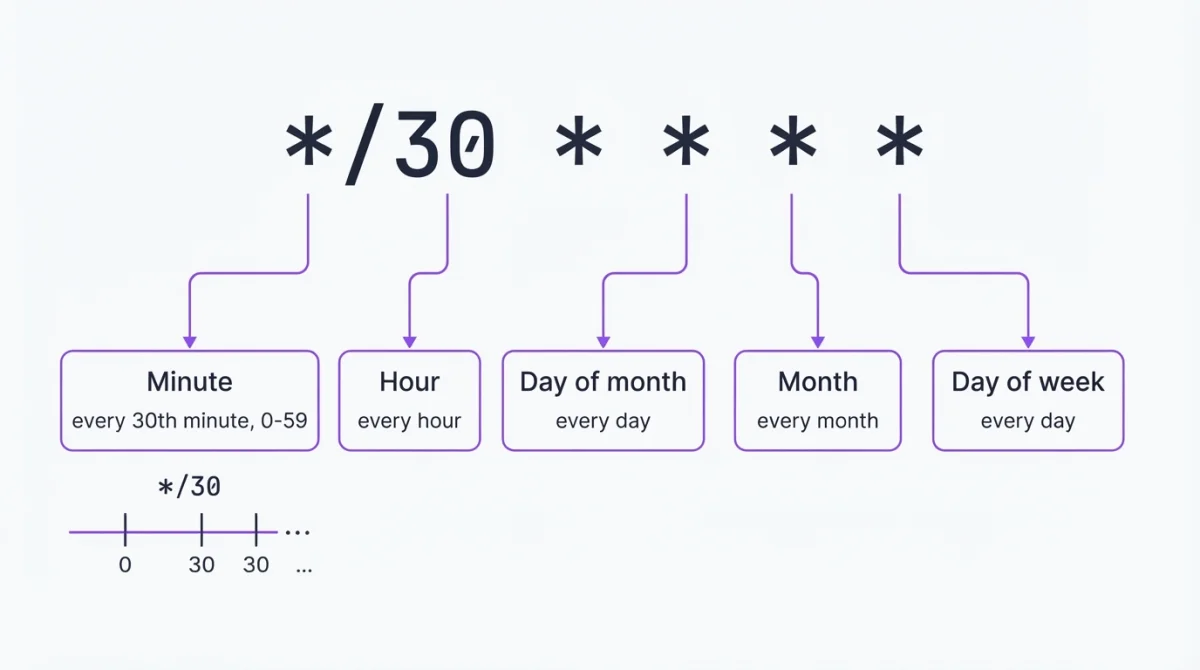
You'll also encounter 0,30 * * * * — it's identical. With only two values, the step syntax barely saves a keystroke. There's something satisfying about 0,30 though: two values, perfectly symmetrical, no ambiguity. Use whichever you find more readable. Build it visually if you want to compare.
What 30 minutes is good for
Half-hour intervals sit at the boundary between polling and batch processing. Too frequent for heavy reports, too infrequent for real-time monitoring — but exactly right for a category of tasks that most teams have:
- Email digests and notification batches. Aggregate the last 30 minutes of activity into one email instead of firing individual notifications.
- Cache warming. Rebuild caches for pages with moderate traffic — heavy enough that every 15 minutes wastes resources, but stale enough at one hour that users notice.
- API syncs with rate limits. Inventory feeds, CRM syncs, payment reconciliation — APIs with per-hour rate limits often work best at 2 calls/hour instead of 4.
- Database maintenance. Purging expired sessions, cleaning temp tables, archiving old records. Not urgent enough for 15-minute runs, but leaving it to a daily job means the table bloats all day.
- Sitemap and feed rebuilds. RSS feeds, XML sitemaps, product catalogs — content that changes throughout the day but doesn't need minute-level freshness.
If your task doesn't fit any of these patterns, you're probably better off at a different interval. Use the cron job calculator to preview run times for alternative expressions.
Variations
Every 30 minutes during business hours:
*/30 9-17 * * 1-5 /path/to/script.shFires from 9:00 to 17:30, Monday through Friday — 18 runs per workday. Good for syncs and reports that only matter when people are working.
Offset to avoid the :00 stampede:
5,35 * * * * /path/to/script.shRuns at :05 and :35 instead of :00 and :30. On any server with more than a handful of cron jobs, minute :00 is the busiest moment — hourly, daily, and half-hour jobs all collide. Shifting by five minutes costs nothing and dodges the pile-up.
Every 30 minutes, weekdays only:
*/30 * * * 1-5 /path/to/script.shRuns 48 times on weekdays, zero on weekends. Useful for business-facing tasks where weekend runs are wasted cycles.
Every 30 minutes except during maintenance window:
*/30 1-3 * * * /path/to/script.shRestricts runs to 1:00–3:30 AM — six runs during a nightly maintenance window. Flip the logic for "everything except maintenance" by using two entries or a wrapper script.
Not sure your expression is right? Validate it or browse the examples library.
Setting it up
crontab -eAdd the entry with absolute paths and output redirection:
*/30 * * * * /usr/bin/php /var/www/myapp/artisan reports:digest >> /var/log/digest-cron.log 2>&1Confirm with crontab -l. Quick checklist:
- Absolute paths —
/usr/bin/php, notphp. Find yours withwhich php. - Output redirection —
>> /path/to/log 2>&1. Without it, cron tries to email the output, and on most servers that email vanishes. - No interactive commands. Cron has no terminal.
Pitfalls
Confusing 30 * * * * with */30 * * * *. Drop the */ and you go from two runs per hour to one — at minute 30 only. The expression 30 * * * * fires 24 times a day, not 48. Common when someone edits a */30 entry and strips the step operator by mistake.
The midnight collision. Both */30 and 0,30 fire at :00 — including midnight. At 00:00, your half-hour job collides with daily jobs (0 0 * * *), weekly jobs, and anything tagged @daily. If your script is resource-heavy, offset to 5,35 or 10,40 so the midnight run clears before the batch jobs start.
Spacing out doesn't fix broken jobs. We've debugged setups where someone moved from */15 to */30 thinking it would fix a timeout issue. It didn't — the job still timed out, just half as often. The fix was the job, not the interval. If a script fails at every 5 minutes, running it less frequently reduces the blast radius but doesn't solve the problem.
Log growth at 48 entries/day. Two runs per hour sounds modest, but over weeks the log file grows quietly. At */5 people set up rotation immediately; at */30 they assume it's fine and revisit months later when the disk fills. Rotate your cron logs the way you'd rotate any other.
Overlap on heavier scripts. Fifteen minutes of headroom is generous for most jobs, but database exports and API crawlers can exceed it. Lock it:
*/30 * * * * /usr/bin/flock -n /tmp/digest.lock /path/to/script.shWhen 30 minutes fits — and when it doesn't
| Schedule | Expression | Runs per day |
|---|---|---|
| Every 5 minutes | */5 * * * * | 288 |
| Every 15 minutes | */15 * * * * | 96 |
| Every 30 minutes | */30 * * * * | 48 |
| Every hour | 0 * * * * | 24 |
| Every 2 hours | 0 */2 * * * | 12 |
| Every day at midnight | 0 0 * * * | 1 |
Honestly, if your script takes more than a few seconds to run, 30-minute intervals are the lowest I'd go before adding flock. At */5 you'd already have it; at */30 you think you're safe, and that's exactly when overlap sneaks in.
Confirming it ran
Wait 30 minutes, then check:
grep CRON /var/log/syslog | tail -5That confirms cron executed the command. For the script's own output, check the log file you redirected to.
For jobs that matter — and a 30-minute gap is long enough to notice — logs alone aren't enough. Heartbeat monitoring catches what nobody checks: your script pings a URL after each run, and if the ping goes missing, you get an alert through Slack, email, or whatever you've configured.
When crontab isn't available
On managed hosting or serverless platforms without shell access, an external service handles the scheduling. Set the expression to */30 * * * *, point it at your endpoint, and it fires the request every 30 minutes from its own infrastructure. WatchCron's Cloud Cron does this — and if the endpoint fails, it retries and alerts through 10+ notification channels.
Know when your 30-minute job stops running
A job that runs 48 times a day can fail silently for hours. Heartbeat monitoring closes that gap. Free plan includes 20 monitoring checks.