
Not everything needs to run every hour. The report that aggregates yesterday's data, the DNS check against blocklists, the external backup verification? Those don't need hourly attention. A cron every 2 hours schedule hits a practical sweet spot: frequent enough to catch problems within a reasonable window, rare enough that you're not burning cycles. The expression is 0 */2 * * *, and it fires at 00:00, 02:00, 04:00, all the way through 22:00. Twelve times a day.
Below: how the cron every 2 hours expression works, how to offset it to odd hours, how to restrict it to business hours, and where this particular interval tends to go wrong.
The cron every 2 hours expression: 0 */2 * * *
Five fields, left to right: minute, hour, day of month, month, day of week. The */2 is a step value in the hour field. It tells cron to fire every second hour, starting from zero.
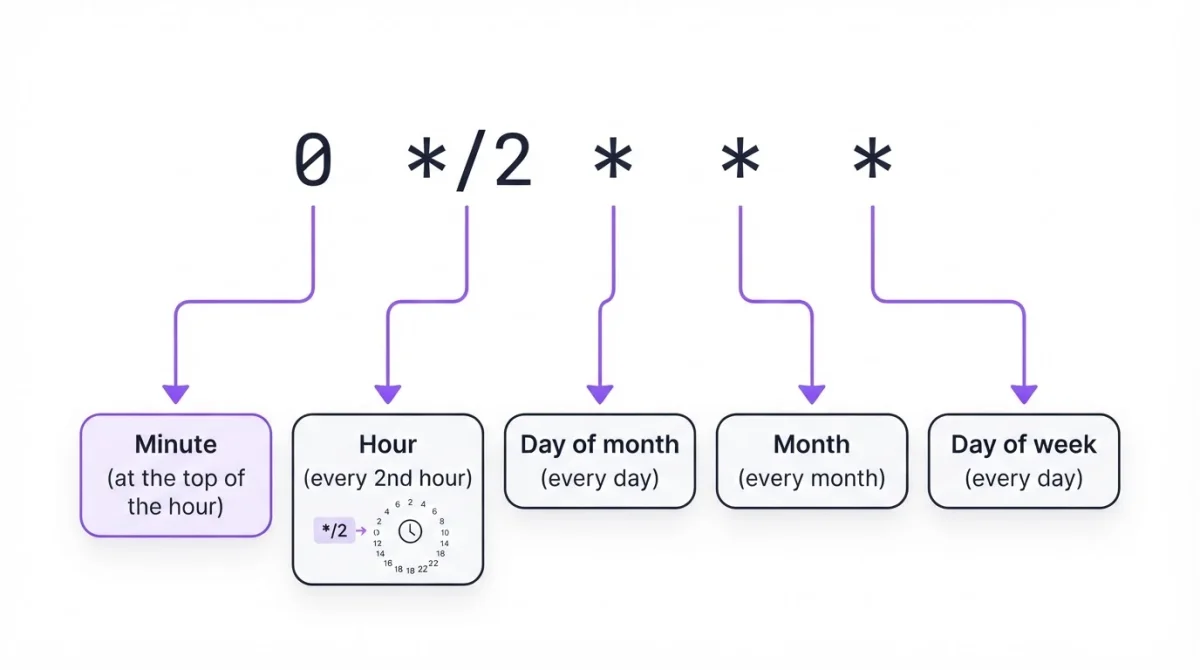
The 0 in the minute field is doing critical work here. Without it (if you wrote * */2 * * *) cron would fire every minute during those hours. That's 720 runs a day instead of 12. We saw this on a client's staging server last year. Sixty cron invocations per hour instead of one, and the database connection pool was exhausted in under 20 minutes.
Side note: */2 is shorthand for the explicit list 0,2,4,6,8,10,12,14,16,18,20,22. Both produce identical schedules. The step syntax is just shorter to type and harder to miscount. You can build and test the expression visually or run it through the validator before deploying.
Adding crontab every 2 hours
crontab -eAdd a line with absolute paths. Cron doesn't load your shell profile, so python3 alone won't resolve:
0 */2 * * * /usr/bin/python3 /opt/scripts/aggregate-reports.py >> /var/log/bi-hourly-report.log 2>&1Confirm the entry:
crontab -lThe >> appends stdout and stderr to a log file. Without it, cron tries to email the output through sendmail. On most servers built after 2003, sendmail isn't configured, so the output vanishes into a dead mail spool. You'll debug for 40 minutes before realizing the error message was sitting there all along.
If your script needs environment variables (API keys, database URLs), either source them inside the script or declare them directly in the crontab above the schedule line: DB_HOST=10.0.0.5. Cron won't load .env files or your .bashrc.
Starting at an odd hour
By default, */2 starts from hour zero: 0, 2, 4, 6, 8, 10, 12, 14, 16, 18, 20, 22. But maybe you want the cron job every 2 hours at odd times instead: 1, 3, 5, 7, and so on. Useful when you're staggering workloads across multiple cron jobs so they don't all hammer the database at the same moment.
0 1-23/2 * * * /path/to/script.shThe range 1-23 sets hour 1 as the starting point. The /2 increments by two from there: 1, 3, 5, 7, 9, 11, 13, 15, 17, 19, 21, 23. Same twelve runs. Just shifted by one hour.
Want it to start at hour 3 specifically? 0 3-23/2 * * * gives you 3, 5, 7, 9, 11, 13, 15, 17, 19, 21, 23. That's eleven runs, not twelve, because 24 isn't evenly divisible from every starting point.
Every 2 hours during business hours only
Running a report aggregator at 2 AM serves no one if nobody reads reports until 9. Restrict execution to working hours:
0 9-17/2 * * 1-5 /path/to/script.shFires at 9:00, 11:00, 13:00, 15:00, and 17:00. Five times per weekday. The 1-5 in the day-of-week field limits it to Monday through Friday.
If you need wider coverage, say 8 AM to 8 PM:
0 8-20/2 * * * /path/to/script.shThat's 8, 10, 12, 14, 16, 18, 20. Seven runs, every day including weekends. Use the cron job calculator to preview the exact firing times before committing.
Common mistakes with every-2-hour schedules
Putting */2 in the wrong field. The expression */2 * * * * runs every 2 minutes, not every 2 hours. That's 720 runs per day. The fields look similar enough that this happens more than you'd think, especially when copying expressions between systems that use different field orders. A cron expression cheat sheet helps keep the field order straight. Quartz cron (used in Java/Spring) has six fields with seconds first, so a Quartz expression doesn't paste into standard crontab without adjustment.
Timezone drift during DST. Cron runs on system time. During the spring-forward transition, the hour from 2:00 to 3:00 doesn't exist, so your 02:00 job simply won't fire. During fall-back, 01:00-02:00 repeats, and a job scheduled for that window can run twice. For a 2-hour schedule this means 11 or 13 runs on those two days instead of 12. The timezone converter helps plan for this, but the real fix is running your server on UTC.
Long-running overlap. If your script takes 2.5 hours, the next invocation starts while the previous one is still running. They'll compete for locks, connections, temp files. Protect against this:
0 */2 * * * /usr/bin/flock -n /tmp/bi-hourly.lock /path/to/script.shThe -n flag makes flock exit immediately if the lock file is held. The new instance skips instead of queuing. Check your logs afterward. Consistent skips mean the script needs optimization or a longer interval.
Checking that it actually ran
A 2-hour cron job that fails silently gives you a 2-hour gap before the next attempt. If that one fails too, you're 4 hours behind. For jobs where that matters, hoping someone checks the logs isn't a strategy.
Start with system logs:
grep CRON /var/log/syslog | grep "aggregate-reports" | tail -10That proves cron invoked the command. Whether the command did anything useful is a different question. Check /var/log/bi-hourly-report.log for actual output and errors. A Python traceback at 04:00 isn't helpful if nobody reads it until Monday morning.
The more reliable approach: have the script ping a URL after each successful run. If the ping doesn't arrive within the expected 2-hour window plus a grace period, you get an alert (Slack, email, Telegram, whatever channel makes sense). For a cron job running every 2 hours, only 12 times a day, each missed run carries more weight than a job that fires every 5 minutes. Catching the first failure matters.
Related schedules
| Schedule | Expression | Runs per day |
|---|---|---|
| Every 30 minutes | */30 * * * * | 48 |
| Every hour | 0 * * * * | 24 |
| Every 2 hours | 0 */2 * * * | 12 |
| Every 3 hours | 0 */3 * * * | 8 |
| Every 4 hours | 0 */4 * * * | 6 |
| Every 6 hours | 0 */6 * * * | 4 |
| Every 8 hours | 0 */8 * * * | 3 |
| Every day at midnight | 0 0 * * * | 1 |
Steps like */5 or */7 in the hour field produce uneven gaps. */7 gives you 0, 7, 14, 21, then wraps back to 0 (a 3-hour gap). Stick with divisors of 24 (1, 2, 3, 4, 6, 8, 12) for evenly spaced runs. Browse more patterns in the cron expression examples library.
When crontab isn't available
Managed hosting, containerized apps without a persistent cron daemon, serverless functions that need a trigger. Plenty of environments where crontab -e isn't an option. An external scheduler handles this: you provide a URL and the cron expression every 2 hours (0 */2 * * *), and it sends an HTTP request to your endpoint from its own infrastructure.
If the scheduler also monitors the response, flagging 500s, retrying on timeouts, alerting through Slack or email, you get execution and health checking from a single configuration. WatchCron's Cloud Cron works this way, with 10+ notification channels included.
Run and monitor cron jobs every 2 hours
Three Cloud Cron jobs and 20 monitoring checks on the free plan. No credit card.