
Let's Encrypt certificates renew themselves every ninety days, right up until the renewal quietly stops firing. The certbot timer breaks after a server migration, nothing else changes, and three months later a customer screenshots the red "Your connection is not private" warning on your checkout page and asks whether you've been hacked. The certificate didn't crash. It just reached its expiry date with no one watching the clock.
That's the failure this exists to prevent. A certificate is the rare outage you can see coming weeks ahead, but only if something is counting down the days for you.

Why a certificate lapses with no warning
An expiry date is baked into a certificate the moment it's issued, and the certificate works flawlessly right up to that second, then stops. There's no slow degradation to notice, no error in your logs the week before. Auto-renewal is supposed to handle it, which is exactly why it's dangerous: when renewal works, it hides the deadline completely, so the one time it fails, nobody has been looking at that date in months. Renewals fall over for dull reasons, a moved server, a changed DNS record, a hit rate limit, a cron entry dropped in a deploy, and none of them announce themselves.
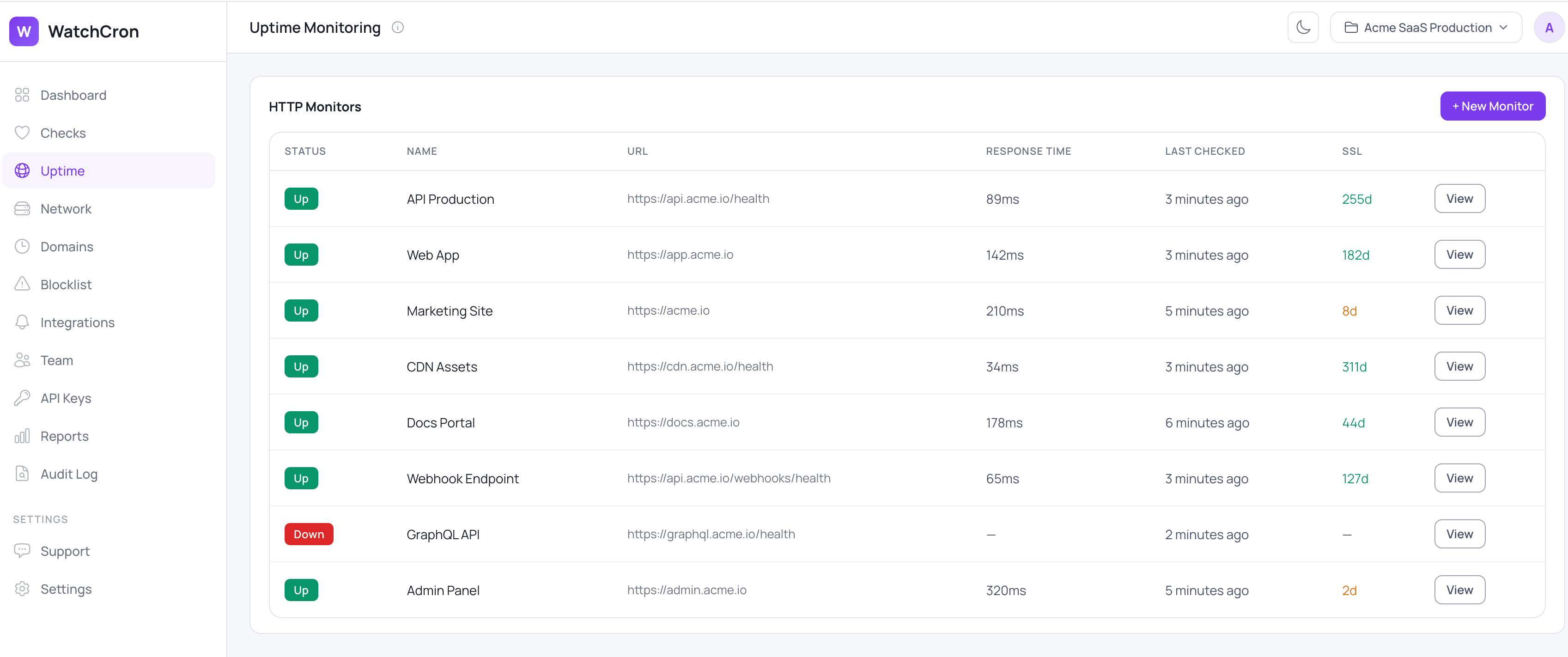
Across a real estate of sites, the problem multiplies. A team might have a dozen domains and subdomains, each on its own certificate with its own expiry, and no single place that shows all those dates at once.
WatchCron puts them in one column, so a certificate with eight days left is notable in amber long before it turns into a browser warning.
It's already on, inside your uptime checks
There's no separate SSL product to buy or set up. Certificate checking is a property of every uptime monitor, a checkbox that's on by default, so the moment you monitor a site's availability you're also watching its certificate. If you already run uptime monitoring, the certificates are covered without touching another setting. This page is about that layer specifically: the certificate side of an uptime monitor, rather than the request-and-response side.
What WatchCron reads off the certificate
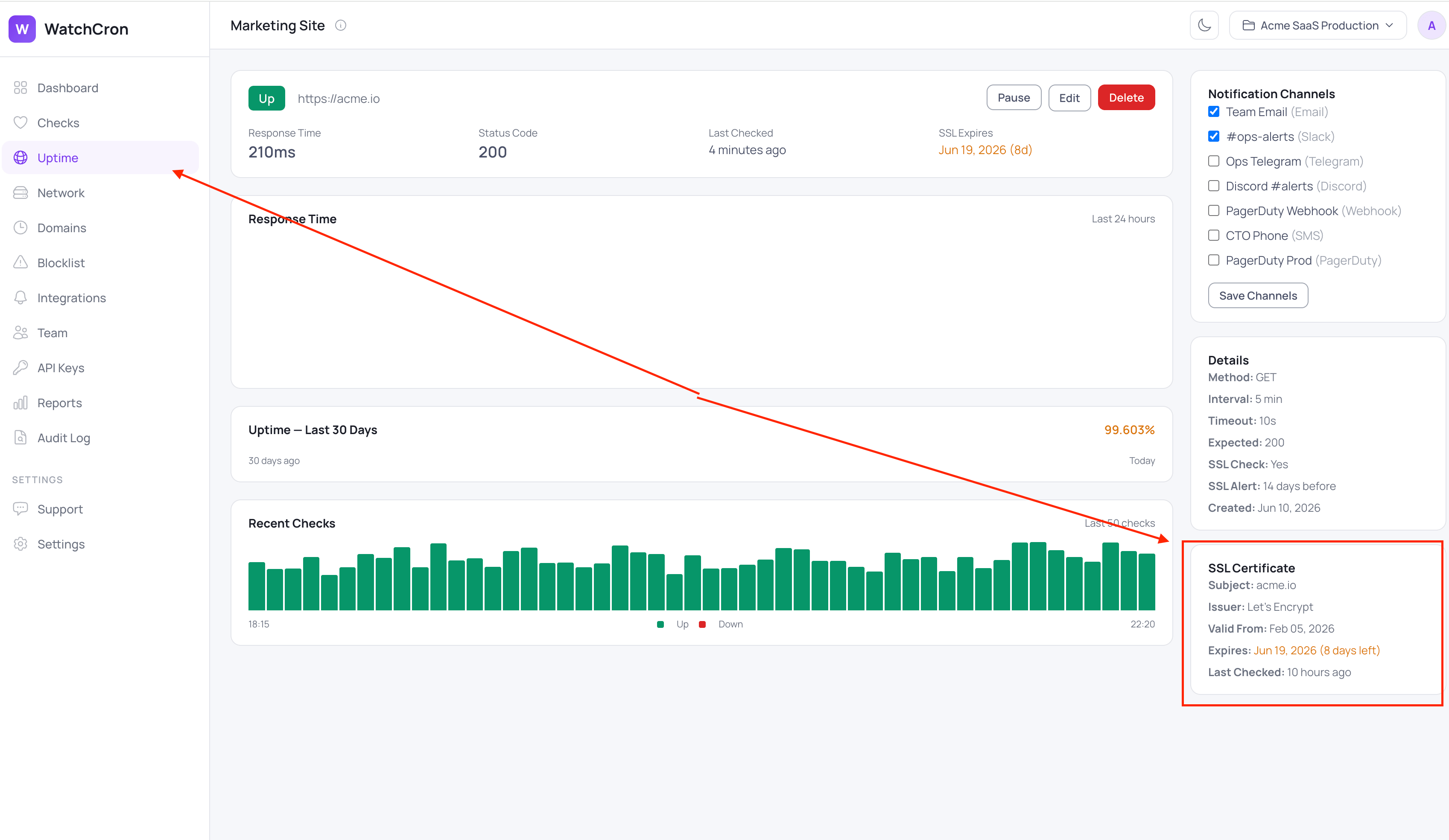
On its own schedule, WatchCron connects to the host on port 443, reads the certificate the server presents, and records what matters for keeping it alive: the subject it was issued for, the issuer that signed it (Let's Encrypt, DigiCert, and the like), the date it became valid, and the date it expires. It also verifies the certificate chain and checks that the hostname actually matches the certificate, so one issued for the wrong name doesn't quietly pass as healthy. All of it is cached, so the dashboard shows the issuer, the validity window, and the days remaining instantly rather than reconnecting every time you look.
Warned early, then reminded until it's renewed
You decide how much runway you want: a warning threshold from 1 to 90 days out, set per monitor, defaulting to 14. When a certificate crosses that line, the alert goes through whatever channels that monitor already uses, and then WatchCron keeps reminding you once a day until the certificate is actually renewed. A single email lost in a busy inbox doesn't cost you the deadline. Renew the certificate and the reminder quietly resets itself, ready to count down again next cycle. A certificate that has already lapsed alerts too, with the days remaining ticking into the negative.
One detail matters for keeping the signal clean: none of this touches the up/down status. A site with a certificate about to expire is still serving traffic, so an expiring certificate is a warning, not a downtime alarm, and it won't get buried under outage noise or page someone at 3am as though the site were offline. The alerts ride the same channels as everything else in WatchCron, with email and webhooks on every plan including the free one, Slack, Telegram, Discord, and Microsoft Teams from Starter, SMS on Pro, and phone-call, PagerDuty, and OpsGenie on Business.
What it doesn't check
The check reads the certificate the server hands over on port 443, which sets its honest boundaries. It won't tell you a certificate has been revoked, since it doesn't query OCSP or CRL. It doesn't grade key strength or cipher choice, and it validates the leaf certificate your server presents rather than auditing every intermediate in the chain on its own. Checks come from a single location. And because the certificate check rides on an uptime monitor, you can't watch a certificate in isolation without also monitoring the site, though for almost every site that pairing is exactly what you'd want anyway.
One thing it's deliberately not: the domain registration itself runs on a completely separate clock and can lapse while every certificate is perfectly valid. That's cron job monitoring's neighbor, domain expiration monitoring, a different check for a different deadline. If you're mapping out which layer catches what, the comparison of monitoring types and the docs both go further.
Never get caught by an expired certificate again
Every uptime monitor checks its certificate by default and warns you with days to spare. The free plan covers it with email and webhook alerts, no credit card and no separate SSL tool to wire up.