
Most scheduled tasks don't need to run every minute. Report generation, cache warming, API syncs, database cleanups — once an hour handles all of these without hammering your server. The cron expression you need is 0 * * * *, and it fires at the top of every hour: 00:00, 01:00, 02:00, all the way through 23:00. Twenty-four times a day.
Below: how cron every hour works, the @hourly shortcut, useful variations, and the mistakes that make your "hourly" job run every minute instead.
The expression: 0 * * * *
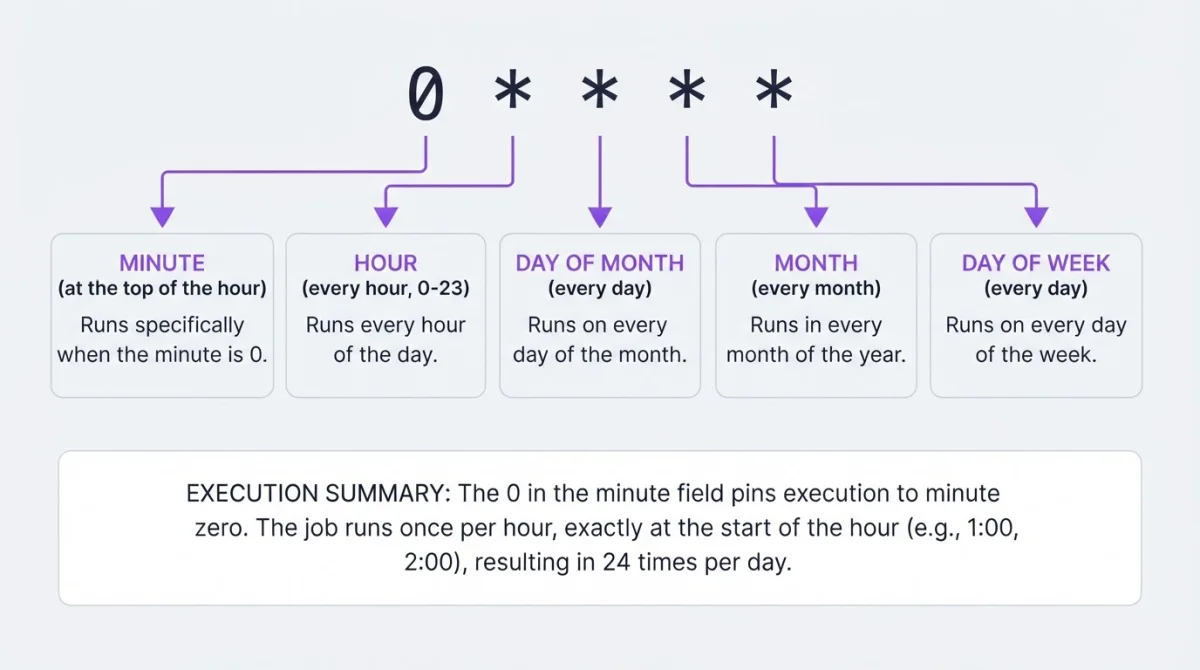
The key is the 0 in the minute field. It tells cron to fire only when the minute is zero — the top of the hour. The remaining four wildcards mean every hour, every day, every month, every day of the week.
If you've seen the @hourly cron shorthand in crontab files — that's an alias for exactly 0 * * * *. Both produce the same cron expression every hour. Standard cron and most Linux distributions support it. Some cloud schedulers (Google Cloud Scheduler, AWS EventBridge) don't recognize @hourly and require the five-field format instead. When in doubt, stick with 0 * * * *.
Setting it up
crontab -eTo schedule a cron every hour, add your entry with absolute paths. Cron doesn't load your shell profile, so php alone won't resolve — you need /usr/bin/php.
0 * * * * /usr/bin/php /var/www/myapp/artisan reports:generate >> /var/log/hourly-report.log 2>&1Or using the shorthand:
@hourly /usr/bin/php /var/www/myapp/artisan reports:generate >> /var/log/hourly-report.log 2>&1Run crontab -l to confirm. With this crontab every hour setup, the job fires 24 times a day. The >> appends output to a log file; without it, cron tries to email the output, which on most servers means it vanishes.
Variations
Not every hourly job belongs at :00. Here are the patterns you'll actually use.
Every hour at minute 30:
30 * * * * /path/to/script.shFires at 00:30, 01:30, 02:30, and so on. Useful when you want to avoid the top-of-hour rush — if your database backup, log rotation, and three other cron jobs all fire at :00, staggering one to :30 spreads the load.
Every 2 hours:
0 */2 * * * /path/to/script.shRuns at 00:00, 02:00, 04:00, 06:00, and so on — twelve times a day. The */2 step value in the hour field works the same way as */5 in the minute field.
Every 3 or 4 hours: Both divide 24 evenly — */3 gives you 8 runs, */4 gives you 6.
0 */3 * * *   /path/to/script.sh
0 */4 * * *   /path/to/script.sh
Try */7 and you'll get an uneven distribution across the day — 0, 7, 14, 21, then back to 0. Same gotcha as with minute-field steps.
Every hour during business hours:
0 9-17 * * 1-5 /path/to/script.shFires hourly from 9:00 to 17:00, Monday through Friday — nine runs per workday. If you only need it until 4 PM, use 9-16 instead.
Specific hours only:
0 6,12,18 * * * /path/to/script.shThree times a day: 6 AM, noon, and 6 PM. No step values, no ranges — just a comma-separated list.
Not sure your expression is right? Build it visually or validate it before deploying.
Common mistakes
The big one: * * * * * instead of 0 * * * *. A wildcard * in the minute field means every minute of every hour — 1,440 runs per day, not 24. This catches everyone at least once. It floods your logs, your database, and your inbox before anyone notices. One missing zero, sixty times the intended frequency.
Timezone surprises. Cron runs on system time. If your server is in UTC and you expect the job at "9 AM your time," it'll fire at 9 AM UTC — which might be 4 AM where you are. Worse: during daylight saving transitions, an hourly job can skip an hour entirely (spring forward) or run twice in the same hour (fall back). Turns out your 24-runs-a-day job ran 23 or 25. Use the timezone converter to plan around this.
Long-running jobs overlapping. If your hourly script takes 70 minutes, the next instance starts before the first finishes. They'll fight over the same resources. Lock it:
0 * * * * /usr/bin/flock -n /tmp/hourly-job.lock /path/to/script.shOutput going nowhere. Without output redirection, cron tries to send results via sendmail. On most modern servers, that's not configured. Your script runs, fails, and the error message disappears into a dead mail queue. You'll debug for an hour before realizing the answer was sitting in an unread mail spool. Always redirect: >> /var/log/job.log 2>&1.
Checking that it actually ran
An hourly cron job failing once means a one-hour gap in whatever it does. Failing silently means you might not notice until someone asks why the report is stale or the cache is cold.
System logs:
grep CRON /var/log/syslog | grep "script.sh" | tail -10This tells you cron invoked the command. Not whether it succeeded.
Your own logs. If you redirected output, check the log file for errors. A 200-line PHP stack trace at 03:00 isn't useful if nobody reads it until Monday.
Heartbeat monitoring. Instead of hoping someone checks the logs, have the script ping a monitoring endpoint after each successful run. If the ping doesn't arrive within the expected window, you get an alert — Slack, email, Telegram, whatever you've configured. For a job that runs 24 times a day, this turns "I wonder if it's still working" into "I'll know within an hour if it stops."
Related schedules
| Schedule | Expression | Runs per day |
|---|---|---|
| Every 5 minutes | */5 * * * * | 288 |
| Every 15 minutes | */15 * * * * | 96 |
| Every 30 minutes | */30 * * * * | 48 |
| Every hour | 0 * * * * | 24 |
| Every 2 hours | 0 */2 * * * | 12 |
| Every 6 hours | 0 */6 * * * | 4 |
| Every day at midnight | 0 0 * * * | 1 |
Use the cron job calculator to preview exactly when any expression fires next. Hourly is the sweet spot for most background work — frequent enough to matter, rare enough to not cause trouble.
When crontab isn't available
On shared hosting or managed platforms without shell access, crontab -e isn't an option. An external service can call your URL on an hourly schedule from its own infrastructure. WatchCron's Cloud Cron handles this — you set the expression to 0 * * * *, point it at your endpoint, and it fires the request every hour. If the endpoint fails, it retries and alerts through 10+ notification channels.
Run and monitor hourly cron jobs
Three Cloud Cron jobs and 20 monitoring checks on the free plan. No credit card.