
A team ran database backups at 0 0 * * * for six months without issues. Then they migrated the server to a new region. The cron expression didn't change — but the server clock was now UTC, not UTC+2. "Midnight" became 10 PM local time, still during active hours, right when the database was being written to. The backups kept running. Nobody noticed until a restore failed.
This guide covers the cron every day expression, how to choose the right time (not just midnight), the @daily shorthand and what it actually means, and the one pitfall that catches more daily jobs than any other: timezone.
The expressions — there is more than one right answer
A cron job running every day has several valid forms depending on when you want it to fire:
| Goal | Expression |
|---|---|
| Every day at midnight (UTC) | 0 0 * * * |
| Every day at 2 AM | 0 2 * * * |
| Every day at 3 AM | 0 3 * * * |
| Every day at 9 AM | 0 9 * * * |
| Every day at 6 PM | 0 18 * * * |
| @daily shorthand | @daily |
The common pattern is 0 H * * * — zero in the minute field (run at the top of the hour), your chosen hour in the second field, wildcards everywhere else. Build your expression visually to confirm the timing before deploying.
Expression anatomy
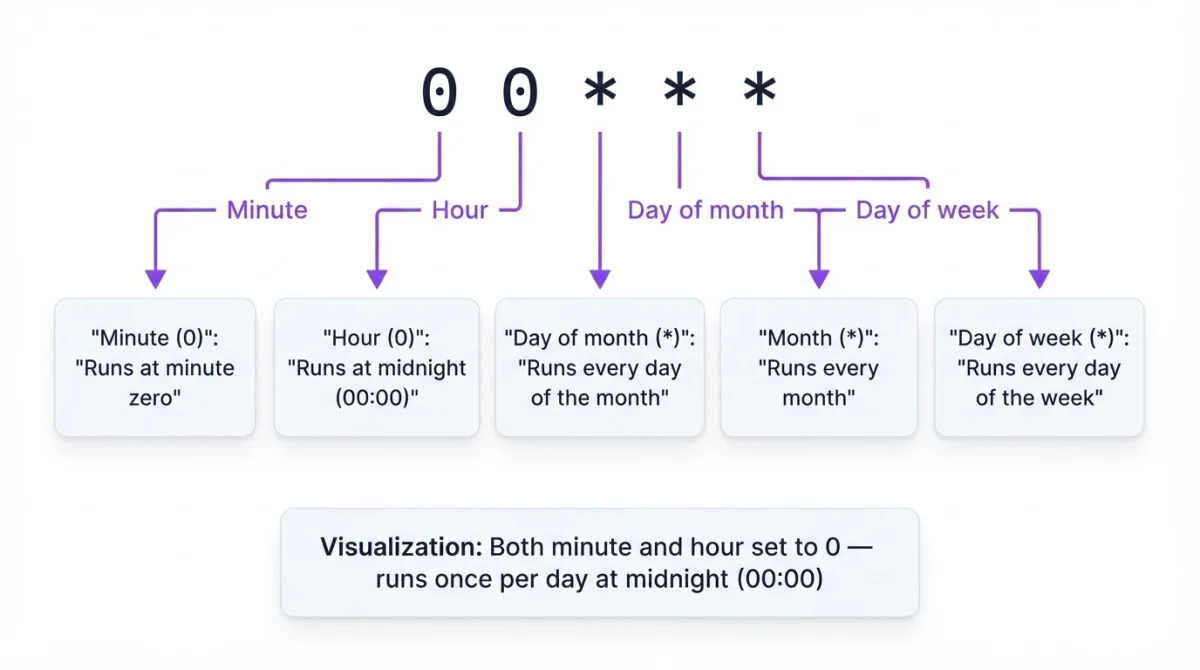
The minute field is 0 in every daily expression above. That's intentional — most people want the job to fire at exactly 2:00, not at 2:47. Put a non-zero value in the minute field only when you're deliberately offsetting to avoid server load collisions.
Choosing the right time
Midnight feels like the default, but it's often the wrong choice. A few practical considerations:
Avoid peak traffic windows. If your app has a daily traffic spike at noon, don't schedule a heavy database export at noon. Pick 3–6 AM when the server is idle.
Avoid 2 AM specifically. Clocks spring forward through 2 AM in many timezones — that hour simply doesn't exist twice a year. A job at 0 2 * * * skips entirely on that night and doubles on the fall-back night. Not catastrophic for a report email, but potentially wrong for billing or deduplication jobs. Pick 3 AM or later to stay clear of the DST window.
Consider your users. A morning digest should fire 30–60 minutes before your users start their day. A daily report for a US team at 9 AM EST means 0 14 * * * on a UTC server.
Stagger from other daily jobs. If your server runs five jobs "every day at midnight," offset them: 0 0, 5 0, 10 0, 15 0, 20 0. Five simultaneous processes at midnight strain the server more than five processes spread over 20 minutes.
The @daily shorthand
@daily is an alias defined as equivalent to 0 0 * * * — midnight UTC. Nothing more, nothing less. It's not "sometime during the day" or "a sensible daily time." Most standard cron daemons support it; @midnight is also valid and identical.
One caveat: @daily does not work on every platform. AWS EventBridge, Vercel Cron, and some managed hosting panels only accept the five-field expression format. If you're deploying across environments, 0 0 * * * is the safer choice. Validate your expression for the specific platform.
Setting it up
crontab -eAdd the entry with absolute paths and output redirection:
0 3 * * * /usr/bin/php /var/www/myapp/artisan backup:run >> /var/log/daily-backup.log 2>&1Confirm with crontab -l. To set a timezone per-job rather than relying on system timezone:
CRON_TZ=America/New_York
0 3 * * * /usr/bin/php /var/www/myapp/artisan backup:run >> /var/log/daily-backup.log 2>&1
Not all cron implementations support CRON_TZ — check your distro's cron docs. The portable alternative is to calculate the UTC equivalent explicitly and hardcode it. Use the cron timezone converter to get the right UTC hour.
Pitfalls
The timezone trap. Your cron daemon runs in the server's system timezone — usually UTC on cloud VMs. 0 0 * * * fires at midnight UTC. If your team is in UTC+3, that's 3 AM local — probably fine. If you're in UTC-5, that's 7 PM — potentially right in the middle of business hours. Check your server timezone with timedatectl or date +%Z before assuming midnight.
@daily means midnight UTC, not midnight local. Developers who switch from 0 0 * * * to @daily assuming it adapts to local time will get the same result — still midnight UTC. The alias is syntactic convenience, not timezone intelligence.
The "set and forget" failure. At every 5 minutes, a failing job surfaces in logs within the hour. At once per day, a silent failure might not be noticed for a week. Seven missed database backups. Seven skipped report emails. Daily jobs compound in a way that hourly jobs don't — by the time you notice, the damage is already done.
No second chance. If the server was briefly under load at 3:00 AM and the job failed to start, you wait 24 hours for the retry. A transient failure at daily frequency is a full day's gap — there's no built-in recovery.
Monitoring the 24-hour window
One run per day means a failure could sit unnoticed for 24 hours. Heartbeat monitoring closes that window: your script pings a URL after each successful run. If the ping doesn't arrive by the expected time, you get an alert — that morning, not the next day.
The pattern in code is one line at the end of your script:
# At the end of your backup script
curl -fsS https://watchcron.com/ping/your-check-id > /dev/null
Set the expected interval to 25 hours (a small grace period for clock drift) and you'll know within the hour if the job didn't run. A health check that fires once a day deserves the same visibility as one that fires every minute.
Know within the hour if your daily job skipped
A daily job that fails silently is a 24-hour gap. Heartbeat monitoring tells you that morning — not the next time you check logs. Free plan includes 20 monitoring checks.
Related schedules
| Schedule | Expression | Runs per day |
|---|---|---|
| Every hour | 0 * * * * | 24 |
| Every day at midnight | 0 0 * * * | 1 |
| Every day at 3 AM | 0 3 * * * | 1 |
| Every weekday at 9 AM | 0 9 * * 1-5 | 1 (weekdays) |
| Every week | 0 0 * * 0 | 0.14 |
| Every month | 0 0 1 * * | ~0.03 |
Use the cron job calculator to preview exact run times for any expression.