
Running something every minute in cron is three keystrokes: * * * * *. Whether cron is the right place to run it — that's the question worth asking first. This is the only interval in the series where the expression is trivially easy and the decision behind it isn't.
Below: when every-minute scheduling makes sense, when it doesn't, the expression breakdown, setup, and the pitfalls that are unique to 1,440 daily runs.
Is cron the right tool?
At every other interval in this guide series, the answer is almost always yes. At one minute, it depends on what you're running.
Cron is the right tool if your task is genuinely periodic — it starts, does work, finishes, and the next run is independent of the last. Health-check pings, log rotation triggers, queue drain scripts where you don't need continuity between runs — these fit.
Cron is probably the wrong tool if what you actually need is something running continuously. A queue worker, a WebSocket heartbeat, a file watcher — these are processes, not tasks. Running them in cron means: a 0–59 second gap at startup, one more gap at each minute boundary, and no guaranteed state between runs. A process manager (systemd, supervisord) handles this better. The expression * * * * * can simulate a persistent process, but it's the wrong abstraction.
If you've confirmed cron is right for your use case — read on.
The expression: * * * * *
Five wildcards. Every field set to "any value." Fires at every minute of every hour of every day.
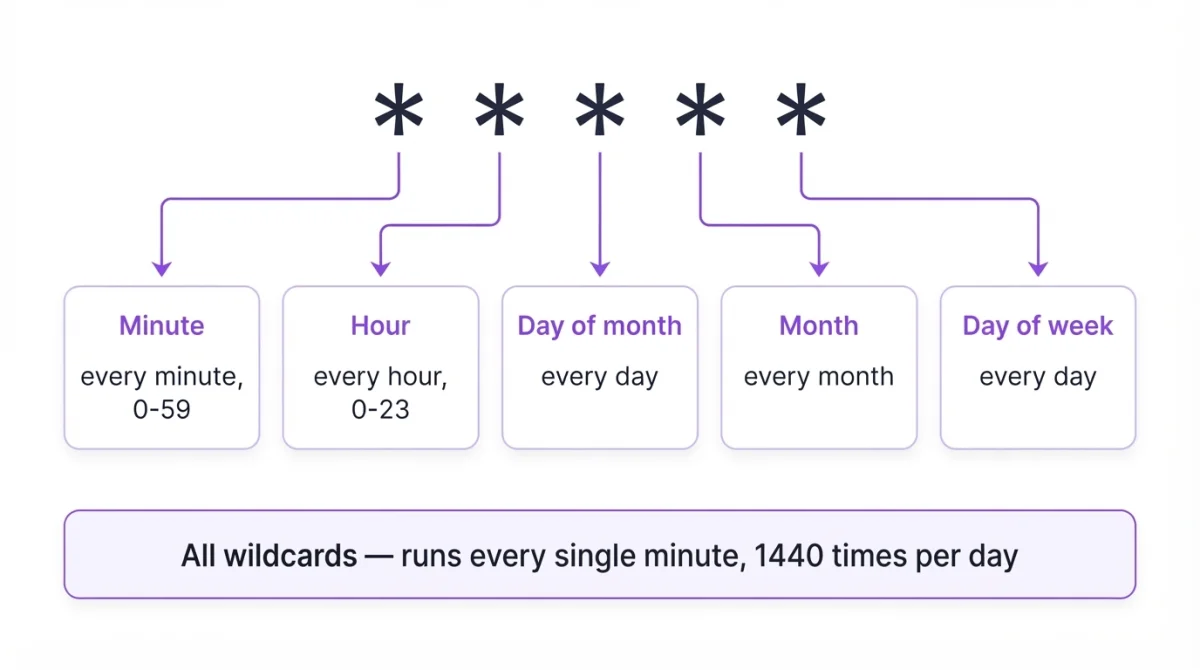
You may also see */1 * * * * — it's identical. The step syntax */1 means "every 1st minute starting from 0," which is every minute. Most people write * * * * *; the */1 form occasionally appears in generated configs. Either works. Build it visually if you want to verify.
1,440 runs per day. That's 10 times more than every 10 minutes, and 60 times more than every hour. Keep that number in mind for every decision below.
Legitimate uses
- Health-check pings. Hit an endpoint, log the status, exit. Fast scripts that report back quickly are exactly what cron every minute is good for. For a more robust setup, heartbeat monitoring handles this without a cron entry at all.
- Queue drain on shared hosting. If you can't run a persistent worker, draining a queue every minute is the next best option. Keep the script fast and lock it (see pitfalls).
- Watchdog scripts. Check if a process is running; restart it if not. Crude but effective when a proper process manager isn't available.
- Log rotation triggers. For high-volume logs that fill up fast, per-minute checks are reasonable. Most
logrotatesetups don't need this, but edge cases exist.
Setting it up
crontab -eAdd the entry — absolute paths, output redirected:
* * * * * /usr/bin/php /var/www/myapp/artisan queue:work --stop-when-empty >> /var/log/queue.log 2>&1Confirm with crontab -l. The output redirect is not optional here. Without >> /path/to/log 2>&1, cron emails the output to the local user. At 1,440 runs/day, even a single echo "done" floods the mail spool within hours. Most servers silently discard the mail, but some queue it — and you'll notice when the disk fills.
Pitfalls
flock is not optional — it's step one. At every other interval, overlap is a risk you can manage. At one minute, any script that occasionally takes longer than 60 seconds will stack. Not eventually — within the first hour on a slow day. Add the lock before you add the crontab entry:
* * * * * /usr/bin/flock -n /tmp/myapp.lock /path/to/script.shThe -n flag means "skip this run if the lock is already held" rather than waiting. A waiting flock at one-minute intervals creates a queue of stalled processes faster than you'd expect.
1,440 runs/day changes every resource calculation. At every 5 minutes, 17 API calls per run means 4,896 calls per day — probably fine. At every minute, that's 24,480. Database connections, filesystem writes, external API quotas — redo the math for 1,440. What costs pennies at 10-minute intervals costs dollars at one-minute intervals on cloud infrastructure.
Cron is not a process manager. If your requirement is "this must always be running with no gaps," cron every minute doesn't deliver that. There's always a potential 0–59 second gap between when a run ends and the next one starts. For true continuity, use systemd or supervisord to manage the process directly.
No recovery time between runs. At every 30 minutes, a flaky external API has half an hour to recover before the next call. At one minute, you hammer it 60 times an hour. If your script depends on an external service, this turns a temporary outage into 60 failed runs before anyone notices.
Variations
Every minute during business hours only:
* 9-17 * * 1-5 /path/to/script.shCuts 1,440 daily runs to 540. If your use case is time-sensitive during work hours but irrelevant at night, this is worth the reduction.
Every minute with flock and logging:
* * * * * /usr/bin/flock -n /tmp/myapp.lock /usr/bin/php /var/www/myapp/script.php >> /var/log/myapp.log 2>&1The full production-ready pattern: lock, absolute paths, output captured. Start with this, not the bare expression.
Not sure your expression is right? Validate it before deploying.
Monitoring 1,440 daily runs
A cron job that fires 1,440 times a day fails silently the same way one that fires once a day does. You'll never notice one missed run manually. At this frequency, you shouldn't be checking logs — you should have a signal that tells you when a run doesn't happen.
Heartbeat monitoring works the other way around: your script pings a URL after each successful run. If a ping goes missing, you get an alert. The first missed run at 2 AM is as visible as the one at 2 PM.
Never miss a failed run at 1,440/day
Your script fires every minute. WatchCron waits for the ping. When it doesn't arrive, you hear about it immediately — not when a user reports it. Free plan, no credit card.
Related schedules
| Schedule | Expression | Runs per day |
|---|---|---|
| Every minute | * * * * * | 1,440 |
| Every 5 minutes | */5 * * * * | 288 |
| Every 10 minutes | */10 * * * * | 144 |
| Every 15 minutes | */15 * * * * | 96 |
| Every 30 minutes | */30 * * * * | 48 |
| Every hour | 0 * * * * | 24 |
Use the cron job calculator to preview when any expression fires next.