You don't need a cron job. You need an HTTP request that fires at a specific time, hits a specific URL, and carries the right data. The schedule part is secondary — what matters is that the webhook arrives, the API responds, and someone knows when it doesn't.
Most teams solve this with a scheduled command on their server that calls a URL every few minutes. Works fine until the server reboots, the certificate expires, or the request starts failing at 3 AM with nobody watching the logs. No retry, no alert, no execution history. You could write a script that logs every call and emails you on failure, but most people don't, because at that point you're building monitoring for your monitoring.
Cloud Cron is a webhook scheduler that sends your HTTP requests from our servers on whatever schedule you define (using standard cron expressions or the built-in schedule picker). Every call gets logged: did the server respond, how fast, any errors. When something breaks, you get an alert through Slack, email, Telegram, or whatever else you've connected. Setup takes about as long as filling out a form.
Three patterns behind "schedule a webhook"
The phrase covers a wider range of real work than you'd expect. Here are the patterns we see most.
Triggering automation platforms without paying for their scheduler. Zapier, Make, and n8n all offer scheduled triggers, but they eat into your task quota or cost extra. A Zapier webhook trigger counts against your monthly tasks every time it fires. Point a Cloud Cron task at the webhook URL instead, and the automation platform only processes inbound requests. No polling, no wasted tasks. Users have told us this cut their Make bill by $30/month, which was more than their entire WatchCron subscription. The real value, though, was knowing the triggers actually fired.
Keeping services in sync. Reconciling Stripe payments against your database every hour. Pulling updated inventory from a supplier's API into your store. Pushing CRM contacts to a mailing list nightly. These are just scheduled HTTP calls, and they break in the same quiet way: the remote server starts returning errors, the sync halts, and you discover the gap two weeks later when a customer complains about stale data.
Automated builds and deploys. GitHub Actions and GitLab both let you start a pipeline by sending an HTTP request to a special URL. Scheduling a nightly build, a weekly dependency check, or a periodic deployment to your staging server is one scheduled call. If writing cron schedules by hand feels cryptic, the visual expression builder helps.
How it compares to Posthook, Cronhooks, and cloud providers
Services like Posthook, Cronhooks, and webhookscheduler.com exist specifically for scheduling HTTP requests. Most focus on delayed or one-time delivery ("fire this request 30 minutes from now") rather than recurring schedules running indefinitely. Posthook starts at $39/month for 20,000 hooks (pricing as of September 2026). Sounds generous until you realize a job firing every minute burns through 43,000 executions per month.
On the other end, cloud providers like AWS and Google Cloud have their own scheduling services. They work, but the setup involves access policies, service accounts, network configuration, and billing that requires a spreadsheet to predict. If you're already deep in that ecosystem, fine. If you just want one URL called every hour, it's like renting a warehouse to store a bicycle.
Cloud Cron sits between these: recurring schedules with full cron expression support, retries, and execution monitoring. You're paying for job slots, not API calls. The free plan includes 3 jobs, and the difference shows up when you look at what happens after the request fires.
Sending webhooks with JSON payloads and Basic Auth
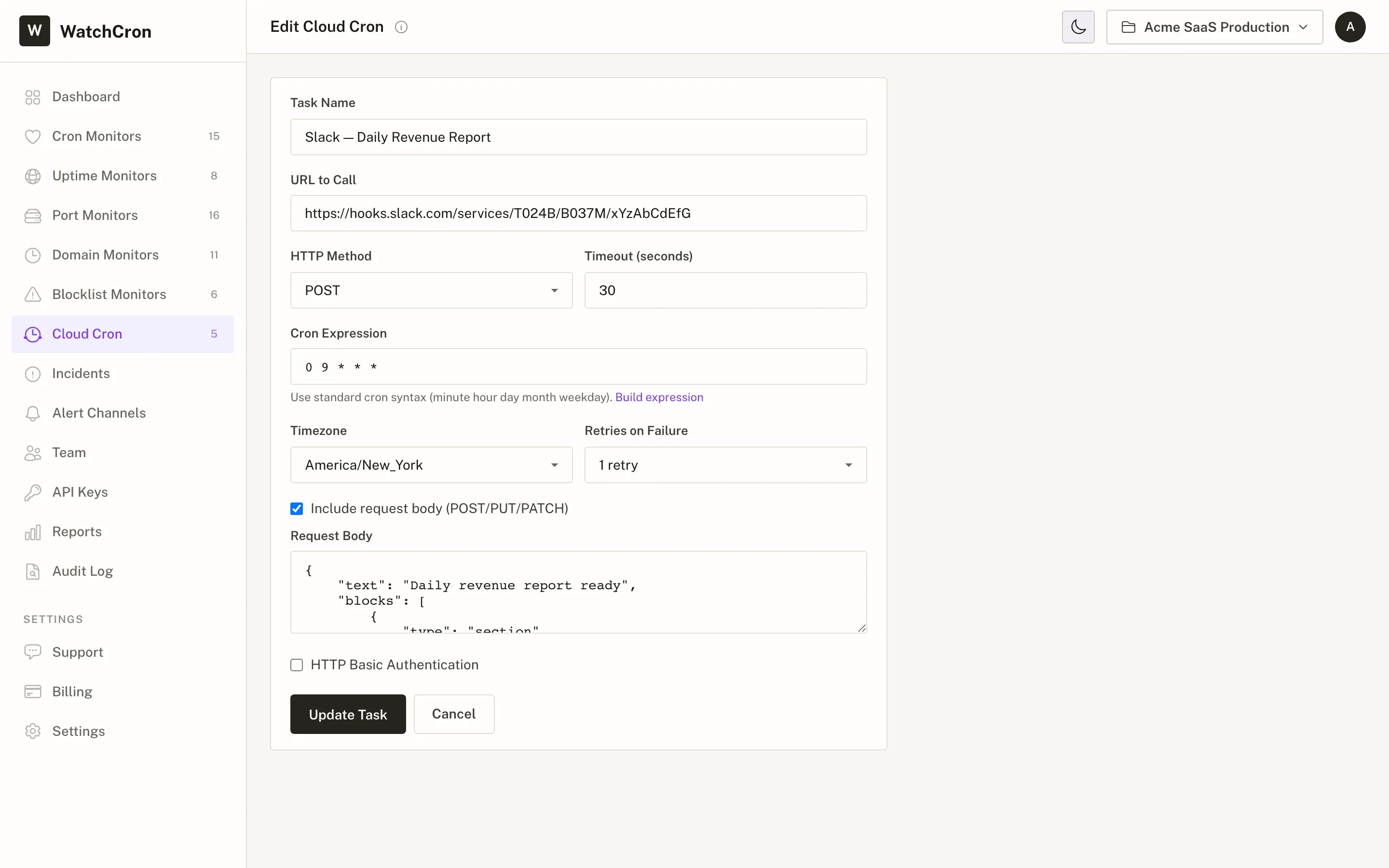
Most webhook endpoints expect a POST with a JSON body. A Slack incoming webhook, for example:
{
  "text": "Daily revenue report ready",
  "blocks": [
    {
      "type": "section",
      "text": {
        "type": "mrkdwn",
        "text": "*Revenue report* for yesterday is ready: <https://app.example.com/reports/daily|View report>"
      }
    }
  ]
}
Paste that into the request body field, set the method to POST, and Cloud Cron sends it on schedule. Scheduled Slack reminders, Discord channel updates, end-of-month invoice alerts. No bot framework needed.
If the URL you're calling requires a login, HTTP Basic Auth is built into the task form. Enter a username and password, and Cloud Cron includes them with every request. All schedules respect your chosen timezone (including daylight saving transitions), so a job set to fire at 9 AM Tokyo time stays at 9 AM Tokyo time year-round.
We don't validate the JSON body before sending it. If there's a typo in your payload, the endpoint's error response shows up in the execution log. Test your payload in the API's own sandbox first. Use Run Now to fire the request immediately and verify the response before committing to a schedule.
When the API you're calling starts degrading
This is where scheduling and monitoring being the same tool pays off. A standalone webhook scheduler fires your request and maybe records whether it succeeded. It won't show you that response times have been creeping up all week, and it won't ping you when errors start piling up.
Cloud Cron logs the result of every call: HTTP status (200 = OK, 500 = server error, etc.), how long the response took, and any error message. Open the response time chart and you'll spot trends before they turn into outages. During a Stripe platform issue last year, we watched one of our test calls slow from 200 milliseconds to 8 full seconds over six days. Stripe's own status page never mentioned it. Our execution log caught the drift on day two.
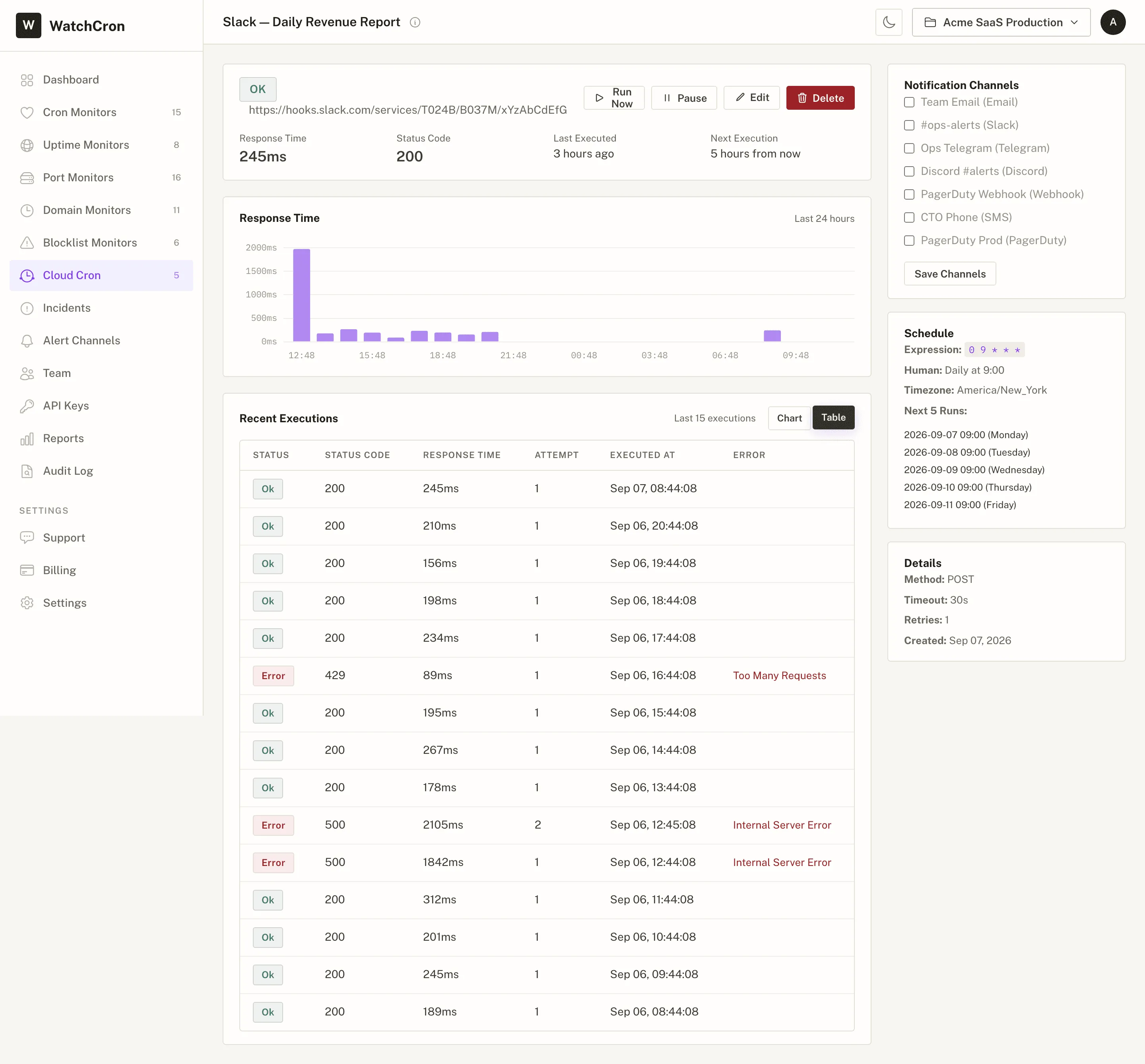
Failed requests trigger alerts through whatever channels you've set up. The same Slack, email, Telegram, or SMS notifications your uptime and heartbeat monitors already use. No separate notification configuration for scheduled webhooks.
If you're also running Cloud Cron for WordPress or other scheduled tasks, everything shares one dashboard, one set of projects, one team permission model.
The same constraints from Cloud Cron apply: the URL must be publicly accessible (not behind a firewall), the response must come back within 60 seconds, and the shortest schedule is once per minute. For calls that take longer or target internal servers, run the job on your own infrastructure and use heartbeat monitoring to confirm it completed.
Schedule your first webhook in under a minute
Three Cloud Cron jobs on the free plan. GET, POST, PUT, PATCH, DELETE. Pick the method, paste the URL, set the schedule. Every execution logged and monitored.