Serverless cron jobs give you scheduled execution without a server — but silent failures, jitter, and platform quirks mean your jobs can stop running for days before you notice.
You probably don't need a Lambda function to run something every hour. A simple managed cron service handles that with zero infrastructure, zero cold starts, and zero IAM policies to debug at 2am. But if you're already on Vercel, already inside AWS, or you need to run actual code — not just hit a URL — then serverless cron is the right call. The trick is knowing what you're actually signing up for.
How serverless cron jobs work#
Traditional cron runs on a persistent daemon. The crond process lives on your server, watches the clock, and forks a subprocess when the schedule fires. Serverless scheduling replaces that daemon with an event scheduler managed by your cloud provider.
A cloud scheduler (EventBridge, Vercel's internal orchestrator, Google Cloud Scheduler) acts as the trigger layer. At the scheduled time, it calls your function via an event or HTTP request. Your function wakes up, runs, and exits. The platform bills you for execution time in milliseconds, not for idle minutes between runs.
No persistent filesystem — every invocation starts clean, and in-memory state vanishes between runs. Those two constraints are expected and easy to design around. The one that catches teams off guard: the scheduler and your function are two separate systems, and they can fail independently. The scheduler fires, the function never runs, nothing logs an error. Or the function runs and crashes at line 47, the platform records a successful invocation anyway, and you find out three weeks later when someone asks why the data hasn't updated.
That's the failure mode this guide is really about. Traditional cron at least writes to syslog when something goes wrong. Serverless cron, by default, writes nothing you'll notice unless you've built the observability layer yourself. See cron job logging strategies for the full picture on that.
Serverless cron platforms: Lambda, Vercel, Cloudflare Workers#
Each major serverless platform ships some form of scheduled execution. The differences matter more than vendors admit.
| Platform | Min interval | Max execution time | Timezone support |
|---|---|---|---|
| AWS EventBridge + Lambda | 1 minute | 15 min hard limit | Scheduler only (not Rules) |
| Vercel Cron (Pro) | 1 minute | Function timeout (default 10s) | UTC only |
| Cloudflare Workers | 1 minute | 10ms CPU (free) / 50ms (paid) | UTC only |
| Google Cloud Scheduler | 1 minute | 30 minutes | Yes |
| Netlify Scheduled Functions | 1 minute | 10s (free) / 30s (paid, beta) | UTC only |
| GitHub Actions (schedule) | 5 minutes | 6 hours per job | UTC only |
Cloudflare Workers' 10ms CPU limit on the free tier sounds tight because it is tight — it's CPU time, not wall-clock time. You can't run a database query, wait for a response, and do anything meaningful in 10ms of compute. The paid tier's 50ms is workable for lightweight tasks like cache invalidation or request routing. Don't plan a data pipeline around it.
GitHub Actions' schedule trigger is convenient for teams already living in GitHub, but it's not a reliable cron replacement for anything time-sensitive. GitHub's own documentation states that scheduled workflows may be delayed during high load on shared runners, and community forums have reports of delays ranging from 20 to 45 minutes. For debugging silent failures, that unpredictability makes root cause analysis harder. Use GitHub Actions schedules for non-critical maintenance tasks, not for anything a customer would notice.
AWS Lambda cron: EventBridge syntax and the jitter problem#
EventBridge is the standard way to trigger Lambda on a schedule. You define a rule with either a rate expression (rate(1 hour)) or a cron expression, and EventBridge fires your Lambda function when the schedule hits.
The cron syntax is not standard Unix cron. EventBridge uses six fields, requires a year field, and demands ? in either day-of-month or day-of-week — not both, not neither. This catches everyone the first time. A valid expression for 9:30 AM UTC, Monday through Friday:
cron(30 9 ? * MON-FRI *)The ? in day-of-month means "any" — required because you've already specified day-of-week. Test the expression in the cron expression builder before deploying; the AWS variant is selectable there.
Now the jitter problem. EventBridge intentionally adds randomness to prevent what AWS calls "thundering herd" — thousands of customers' functions firing at exactly the same second. In practice, your function fires somewhere between 37 and 43 seconds after the scheduled minute. By design. I ran into this the first week we had WatchCron monitoring our own background jobs — spent 40 minutes convinced there was a race condition before finding the EventBridge jitter documentation buried in an AWS blog post. If you need exactly :00 seconds, EventBridge isn't the right mechanism.
EventBridge also guarantees at-least-once delivery. Under rare conditions, your function fires twice for the same scheduled event. If your job sends emails, charges cards, or inserts records, it needs to be idempotent — and if it isn't, that's the first thing to fix before adding any monitoring layer.
AWS Lambda silent failure modes
The EventBridge rule looks healthy in the console. The function never runs. A missing trust policy on the Lambda execution role silently blocks invocations — no error surfaces unless you check CloudWatch manually.\nLegacy EventBridge Rules are UTC-only|EventBridge Rules (not Scheduler) don
Lambda's hard execution limit is 15 minutes. For jobs that regularly run longer, Step Functions or ECS Fargate is the right architecture — not a workaround on top of Lambda.
Vercel cron: setup and the silent failure patterns#
Vercel's cron integration lives in vercel.json. You define a schedule and a path that maps to a serverless function or API route.
Before writing the config, create the handler. For a Next.js app:
// app/api/cron/cleanup/route.ts
export const maxDuration = 10;

export async function GET(request: Request) {
  const authHeader = request.headers.get('authorization');
  if (authHeader !== `Bearer ${process.env.CRON_SECRET}`) {
    return new Response('Unauthorized', { status: 401 });
  }

  await runCleanup();
  return Response.json({ ok: true });
}
Vercel automatically injects CRON_SECRET as a Bearer token on each invocation. Always check it — the endpoint is publicly reachable. Then wire it in vercel.json:
{
  "crons": [
    {
      "path": "/api/cron/cleanup",
      "schedule": "0 9 * * *"
    }
  ]
}
Standard five-field syntax — no year field, no ? quirks. Now the failure patterns that actually cost teams data in production.
The trailing slash trap. If trailingSlash: true is set in next.config.js, Vercel rewrites /api/cron/cleanup to /api/cron/cleanup/. The cron scheduler calls the original path, gets a 308 redirect, marks the run complete. Your function never executed. No error, no alert, the cron logs show green.
The cache trap. If your route is cached — via CDN headers, ISR, or a misconfigured edge config — Vercel's cron request hits the cache, receives a 200, and logs a successful run. The function code never ran. We've seen this show up as "everything looks fine" in cron logs while stale data accumulates silently for a week.
Hobby plan timing. On the free Hobby plan, cron jobs are limited to once per day, and timing is "guaranteed within the hour" — Vercel's own wording. Jobs fire anywhere in a 60-minute window. If you're testing on Hobby and deploying to Pro expecting per-minute accuracy, you're testing the wrong behavior entirely.
The silent failure problem all serverless cron platforms share#
Every platform above has a version of this: the scheduler fires, the function either runs or doesn't, and the platform considers its job done. None of them check whether your business logic succeeded.
Cron has no concept of success, only execution. A function that runs and crashes at line 47 looks identical to one that completes — both show an invocation in the logs, the cleanup job deleted 0 rows instead of 50,000, and the dashboard stays green the whole time.
Standard uptime monitoring can
The established solution is a heartbeat check, sometimes called a dead man's switch. Your job pings a URL on successful completion. A monitoring service watches for that ping; if it doesn't arrive within the expected window, an alert fires. The ping never coming is the signal — not an error code, not an exception.
In Python on Lambda:
import urllib.request
import os

def handler(event, context):
    try:
        run_cleanup()

        # Ping after successful completion — not before
        urllib.request.urlopen(os.environ['HEARTBEAT_URL'], timeout=5)
    except Exception as e:
        print(f"Job failed: {e}")
        raise
And in Node.js for a Vercel function:
export async function GET(request) {
  try {
    await runCleanup();
    await fetch(process.env.HEARTBEAT_URL, { method: 'GET' });
    return Response.json({ ok: true });
  } catch (err) {
    console.error('Cron job failed:', err);
    return new Response('Error', { status: 500 });
  }
}
The ping happens after the job completes, not before. A ping at the start tells you the function started; a ping at the end tells you it finished, those are different things, and for dead man's switch monitoring you want the latter. The cron job timeout guide covers what happens when a job starts but never finishes.
How WatchCron monitors serverless cron jobs#
Cron job monitoring in WatchCron is built around the heartbeat model. Each check gets a unique ping URL, a configurable schedule, and a grace period. When the expected ping doesn't arrive, WatchCron alerts through whichever channels you've configured — Slack, email, PagerDuty, Telegram, or any of the other channels via multi-channel alerts, all available on the free plan.
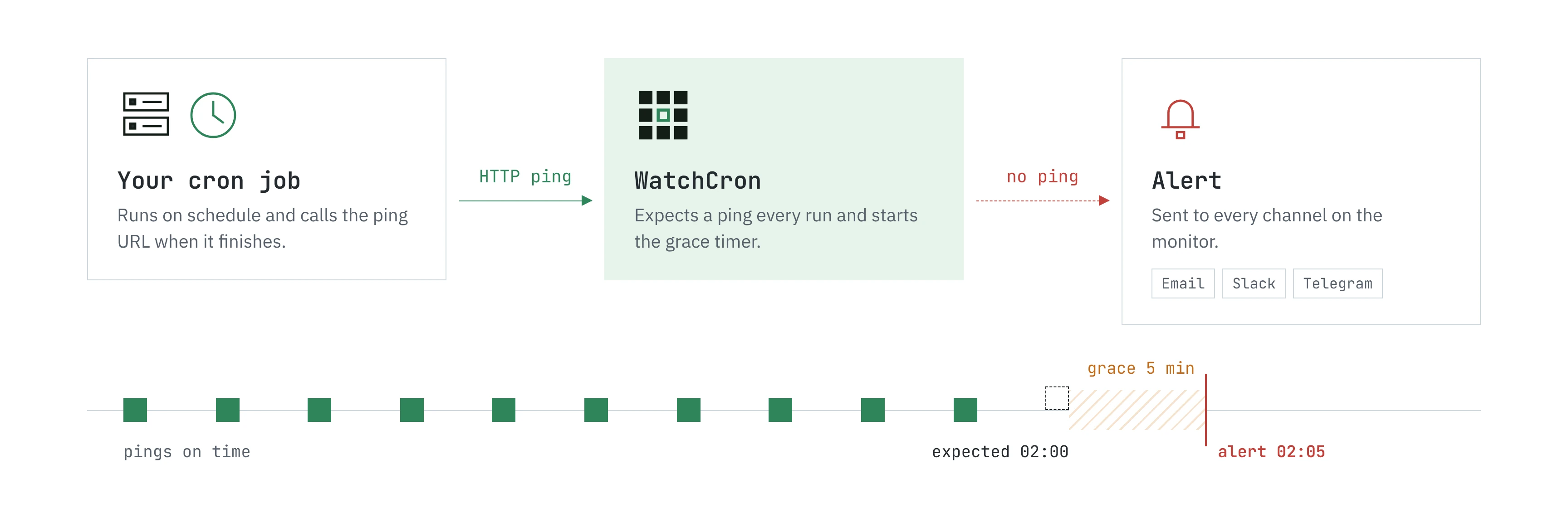
Setup: create a check, copy the ping URL, add it to your function's environment variables, add the one-line ping call at the end of the job. Execution history shows every ping with its timestamp and latency — so you can see not just whether jobs ran, but whether they're drifting, which is an early warning for functions approaching their execution ceiling.
A missed heartbeat on a payment job deserves a PagerDuty escalation. A missed heartbeat on a weekly cleanup can go to a Slack channel. Alert routing is configurable per check.
If you don't need custom function code and just need to run an HTTP request on a schedule, Cloud Cron handles both the scheduling and monitoring in one place with no function deployment. The guide on running cron jobs without a server covers where that fits versus running your own code.
Picking the right serverless cron job platform#
For most teams, the choice comes down to where your code already lives. On Vercel, use Vercel Cron — the integration is tight, the deploy pipeline is familiar, and the failure patterns above are avoidable once you know them. In AWS, EventBridge + Lambda is the natural fit; use EventBridge Scheduler (not legacy Rules) from the start to avoid the timezone drift problem later.
If your jobs run longer than 10 minutes, or process large files, or need more than 1GB of memory — Lambda isn't the right runtime. Google Cloud Scheduler pointing at Cloud Run, or Step Functions for complex workflows, gives you the headroom. Cloudflare Workers cron is solid for edge logic and lightweight tasks where 50ms of CPU is enough.
The platform choice matters less than the observability layer around it. Pick what fits your stack, add heartbeat monitoring, check the execution history occasionally. The jobs that fail quietly for three days aren't failing because of the platform — they're failing because nothing was watching for them. Add external cron monitoring, and those silent failures surface in minutes instead of weeks.
Serverless scheduling works well for the jobs it's designed for. It's the assumption that "scheduled" means "monitored" that keeps causing surprises.
If you're running serverless cron jobs in production right now, it's worth spending two minutes to add a heartbeat check. Create a free WatchCron account, set up a check for each scheduled function, and paste the ping URL into your handlers. You'll go from "I hope everything is still running" to an actual record of every execution — and an alert the next time something stops. Small change, but it's the difference between finding out in two minutes and finding out in two weeks.
Frequently asked#