External cron jobs run on a separate server — no traffic dependency, no process crashes. Learn what they are, how they work, and which service to pick.
The inconvenient thing about cron is that it owes you nothing. It ran, exited with code 0, and moved on. What actually happened inside is not its concern. That's why "the job ran" and "the job worked" are two separate events — even though most setups treat them as the same thing.
External cron jobs add a scheduler on top of that. They're useful, sometimes necessary — but they inherit the same blind spot. This guide covers what external cron actually is, when you need one, and how to close the gap it leaves open.
What Is an External Cron Job?#
A cron job is a scheduled task — something that runs automatically at a defined time or interval. Traditionally, those tasks run on the same server as your application: a Unix daemon reads a crontab, spawns the process, and the job runs. Simple.
An external cron job moves the scheduling part off your server entirely. Instead of your server deciding when to run a task, a third-party service does. At the configured time, that service sends an HTTP request to a URL you control (a webhook endpoint, a Laravel route, a PHP script, a CLI trigger) — and your server handles the work when it receives the request.
The external service is the clock. Your server is still doing the actual work.
Some people also call this a hosted cron job, a webcron, or a managed cron job. All the same idea: scheduling is handled remotely, not locally.
When You Actually Need an External Cron Job#
Not every project needs an external cron service, but several real situations make one the only workable option, and the distinction between 'convenient' and 'necessary' is worth getting clear before you commit to a setup. So when do you actually need one, rather than just reaching for it because it sounds cleaner?
You're on shared hosting without crontab access
Many shared hosts either don't expose a real crontab or impose a 5-minute minimum interval and awkward PHP CLI configurations. Some lock down scheduling entirely. If you can't run crontab -e, you can't run local cron. An external service calling a URL endpoint is the practical alternative.
Your app runs on a platform that sleeps
Render's free tier spins down instances after 15 minutes of inactivity. A cold start takes 20–50 seconds depending on your stack, which means a job that's supposed to send a daily digest might spend half its budget just waking up the process. Vercel's Hobby plan caps scheduled functions at one run per day. If you're using PaaS platforms with these constraints, local scheduling often isn't an option at all. You might want to read about how to keep free-tier apps alive with a scheduled ping while you're thinking through this.
WP-Cron isn't running reliably
WordPress's built-in scheduler only fires when someone visits the site. No visitors, no cron. On low-traffic sites (internal tools, staging environments, client microsites) jobs can queue up and never run. This is why so many WordPress plugins that need external cron exist, and why replacing WP-Cron with a real external trigger is a standard recommendation for production WordPress sites. There's a dedicated guide if you need to replace WP-Cron with a proper external scheduler.
You want scheduling decoupled from your infrastructure
When the scheduler lives on the same host as the application, a crashed server takes down both. An external scheduler continues trying to fire jobs even when your server is temporarily unreachable, which can actually be useful (retries catch brief outages) or misleading (the job log looks fine while the server was down). Either way, the decoupling itself is often worth it for anything that needs to survive a restart.
External Cron Service vs Cloud Cron: What's the Difference?#
This distinction trips people up, and it's worth being precise about.
An external cron service is a scheduler. It fires HTTP requests on a schedule. That's it. Your code runs on your server. The service doesn't know or care what your code does: it just sends the request and records whether it got an HTTP response.
A Cloud Cron service executes the job itself. You give it a command or a script, and it runs that code on remote infrastructure. There's no URL to expose, no server to receive a webhook. The computation happens elsewhere. That's closer to Google Cloud Scheduler + Cloud Run, or to a serverless function on a schedule.
- External cron service: your code, your server — just the trigger is external
- Cloud cron: your code, remote execution — nothing runs on your server
For most developers already running a server, an external cron service is the lighter option. If you want to run cron jobs without a server, cloud cron is the path to explore.
How to Set Up an External Cron Job#
Step 1: Create a URL endpoint for the job
Your scheduled task needs to be triggerable via HTTP. In a Laravel app, that means a route that calls the relevant command or service. Keep it minimal:
// routes/web.php (or api.php)
Route::get('/cron/send-digest', function () {
    Artisan::call('digest:send');
    return response()->json(['ok' => true]);
})->middleware('cron.token');
Protect the endpoint. A shared secret token in the query string or header is the minimum. Without it, anyone can trigger your jobs. Beyond a shared secret, consider restricting the endpoint to the cron service's published IP ranges — cron-job.org and EasyCron both document these. There's more on this in the cron job security guide.
Step 2: Register the job with the external service
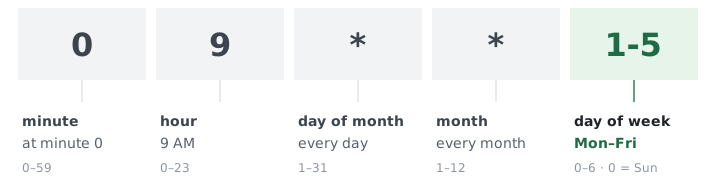
Log in to whichever service you're using, create a new job, paste your URL, and set the interval. Most services use standard cron syntax (0 8 * * * for daily at 08:00) or a friendly interval picker. Set a reasonable job timeout — the maximum time the service will wait for a response before marking the request as failed. For most jobs, 30 seconds is generous; long-running data exports might need 300.
Step 3: Test with an immediate trigger
Every decent external cron service has a "run now" button. Use it. Check that your endpoint returns a 2xx status and that the actual work happened — don't just trust the HTTP response code. This is also a good time to verify your token validation is working by triggering without the token and confirming you get a 403.
Step 4: Set up failure notifications
Most services will email you if a job returns a non-2xx status or times out. Make sure that notification is configured before you consider setup done — that's also where the limitations begin to show. They're real ones.
If you want to schedule HTTP requests online without writing any server-side code at all, a webhook scheduler handles the same pattern with more configuration options.
The Monitoring Gap in External Cron Services#
What does the external scheduler actually know about what happened? Less than you'd expect.
An external cron service tells you whether it successfully called your URL. It doesn't tell you whether your job actually worked. Those are different things, and the gap between them is where silent failures live.
Your backup script can return HTTP 200 while quietly failing to write any files. A payment retry job can respond fine while an ORM exception rolls back the transaction and logs nothing to STDOUT. The scheduler sees "200 OK". Done. Nobody fired an alert.
The fix is to combine two things: an external scheduler to fire the job, and a cron job monitoring system that verifies the job completed. The pattern works like this: your cron job runs, does its work, and at the end sends a "heartbeat" ping to a monitoring URL. If the monitoring service doesn't receive that ping within the expected window, it fires an alert. Now you know the job ran AND finished successfully, not just that someone sent a request to your server.
This is why treating external cron as the final solution misses something important. It's the scheduler. You still need the watchdog. If you've ever found yourself debugging a cron job not running and spending three hours only to discover it ran but failed silently, this pattern is what prevents that next time.
WatchCron covers both sides: use an external service to fire the job, add a WatchCron ping URL to the job itself, and you get multi-channel alerts the moment the job stops checking in — not just when an HTTP call fails.
Common External Cron Pitfalls#
Trusting HTTP 200 as proof of success
If your job handler catches exceptions internally and returns 200 regardless — a common pattern in Laravel queue workers — the external service will never see a failure, every job threw. Make sure your endpoint's response code reflects actual job success, not just "the web server answered."
No retry logic on the free tier
cron-job.org doesn't retry failed requests. If your server was in the middle of a deploy when the job fired and returned a 502, that job is just missed. FastCron adds retry on paid plans; WatchCron Cloud Cron retries up to 3 times on all plans including Free. Decide how much that matters for your specific jobs before picking a service.
Vendor reliability is a real concern
Cronhub, a solid cron monitoring service, shut down in June 2026. Projects that depended on it migrated under pressure. It wasn't a bad product — it just had no paying customer base to keep it alive. Check whether any service you rely on has an SLA and a track record longer than two years. That's the filter.
The same applies in reverse: if the external scheduler itself goes down, your jobs silently stop firing. A cron monitoring layer watching for expected heartbeat check-ins catches scheduler outages the same way it catches job failures.
Timezone mismatches
Your server runs in UTC. The external service defaults to UTC. You set the job to fire at "8am" thinking of your local time. The job runs at 8am UTC, which is 3am Eastern. This one shows up constantly in developer forums — always verify the timezone setting explicitly when creating a job, and document it somewhere visible.
Long-running jobs and HTTP timeouts
If your job takes 4 minutes to run and the external service has a 30-second timeout, the service marks the job as failed even though it completed successfully. Either increase the timeout in the service settings, make the endpoint respond immediately and process asynchronously (push to a queue, return 202), or switch to a tool that handles long-running jobs differently. The cron job timeout guide covers the practical strategies for long-running tasks.
How WatchCron Handles Both Problems#
Most external cron setups leave you with two separate tools: one to fire the job, another to tell you when it fails. WatchCron covers both in the same dashboard.
Cloud Cron fires the HTTP request on schedule, retries up to 3 times if your server doesn't respond, and records the result. If a job misses its window or returns an error, you get an alert through whatever channels you already use — Slack, Telegram, email, PagerDuty, or SMS. No second tool to configure.
If you prefer to keep your existing external cron service, cron job monitoring adds the verification layer on top. Add one line to the end of your script:
curl -fsS https://watchcron.com/ping/your-check-idThat ping is how WatchCron knows the job ran and finished. If it doesn't arrive in the expected window, you get notified through multi-channel alerts — not just an email to an inbox nobody checks. The Free plan covers 20 monitors and 3 alert channels. No credit card required.
The external cron jobs that justify proper monitoring are the ones where a missed run has a real cost: billing retries, overnight data exports, subscription renewals, anything that feeds downstream reports. For those, one ping at the end of the script is the difference between finding out in minutes and finding out when a client calls.
Frequently Asked Questions#
What is an external cron job?
An external cron job is a scheduled task triggered by a third-party service rather than your own server. Instead of a local cron daemon spawning a process, the external service sends an HTTP request to a URL your application exposes at the scheduled time. Your server handles the work when it receives the request.
What's the difference between an external cron service and a cloud cron job?
An external cron service is a scheduler — it fires HTTP requests on a schedule, but your code runs on your server. A cloud cron job runs the code itself on remote infrastructure. No URL to expose, no server needed. External cron services are lighter to set up if you already have a server; cloud cron makes sense when you want to offload execution entirely.
Can I use an external cron job on shared hosting?
Yes, and for many shared hosting setups it's the only practical option. Shared hosts often don't expose real crontab access, impose 5-minute minimum intervals, or restrict PHP CLI. An external cron service calling a URL endpoint works around all of these — as long as your host allows incoming HTTP requests, which it almost always does.
How do I know if an external cron job actually worked?
You don't — not from the scheduler alone. An external cron service only confirms it successfully called your URL. Whether your job succeeded is a separate question. The reliable pattern is to add a heartbeat ping at the end of your job script: when the ping doesn't arrive within the expected window, a monitoring service like WatchCron alerts you. That's how you know the job ran and finished.
Is cron-job.org reliable enough for production?
For low-stakes jobs, yes. cron-job.org has been running since 2012, is free, and supports unlimited jobs at 1-minute intervals. The limitations are no retry logic on failure, email-only notifications, and no SLA. For jobs where a missed run has real consequences (billing, backups, data exports) add a monitoring layer on top, or use a service with retry and multi-channel alerting.
The external cron jobs that justify paying for something better are the ones where failure has a real cost: billing retries, subscription renewals, data exports clients depend on, anything that feeds downstream reports. For those, the combination of external trigger plus active monitoring isn't optional — it's the only configuration that actually tells you the job worked.
Frequently asked#