
A few months ago I lost three days of database backups. The backup script was running on schedule, cron executed it every night at 2 AM, and the logs showed no errors. Everything looked fine from the outside.
The problem was that the disk where backups were stored had filled up silently. The script ran, tried to write, got a "no space left on device" error that went to /dev/null (because someone — me — had redirected stderr there months ago), and exited with code 0 anyway. No alert. No notification. Three days of backups were just gone.
That failure is exactly the kind of thing a dead man's switch catches.
That's when I started thinking seriously about monitoring cron jobs, and that's eventually why I built WatchCron.
The problem with "normal" monitoring
Most monitoring works by watching for bad things to happen. Your server goes down, you get an alert. Your app throws an exception, it shows up in Sentry. A health check returns 500, PagerDuty wakes you up.
This approach has a blind spot — it can't detect the absence of something. If a cron job doesn't run at all (because the server rebooted, crontab got wiped, or the cron daemon crashed) there is no error to catch. Nothing happened, so nothing fires. The classic "cron job not running" scenario is invisible to traditional alerting.
Cron jobs are especially tricky because they fail in ways that produce zero signal:
The job runs but the command inside silently fails
The job doesn't run because crontab was edited and your entry was removed
The server rebooted and the cron daemon didn't restart
The job is running, but it's hanging forever and never completing
The job succeeds but produces wrong results (like writing a 0-byte backup file)
Traditional monitoring catches none of these. You find out when a customer reports missing data, or when you try to restore from a backup that doesn't exist.
Enter the dead man's switch
The concept comes from trains. Old locomotives had a physical pedal or lever that the engineer had to hold down while driving. If the engineer let go (fell asleep, had a medical emergency, or worse) the switch would release and the train would stop automatically.
It boils down to one thing: the system assumes something is wrong unless it gets regular proof that everything is fine.
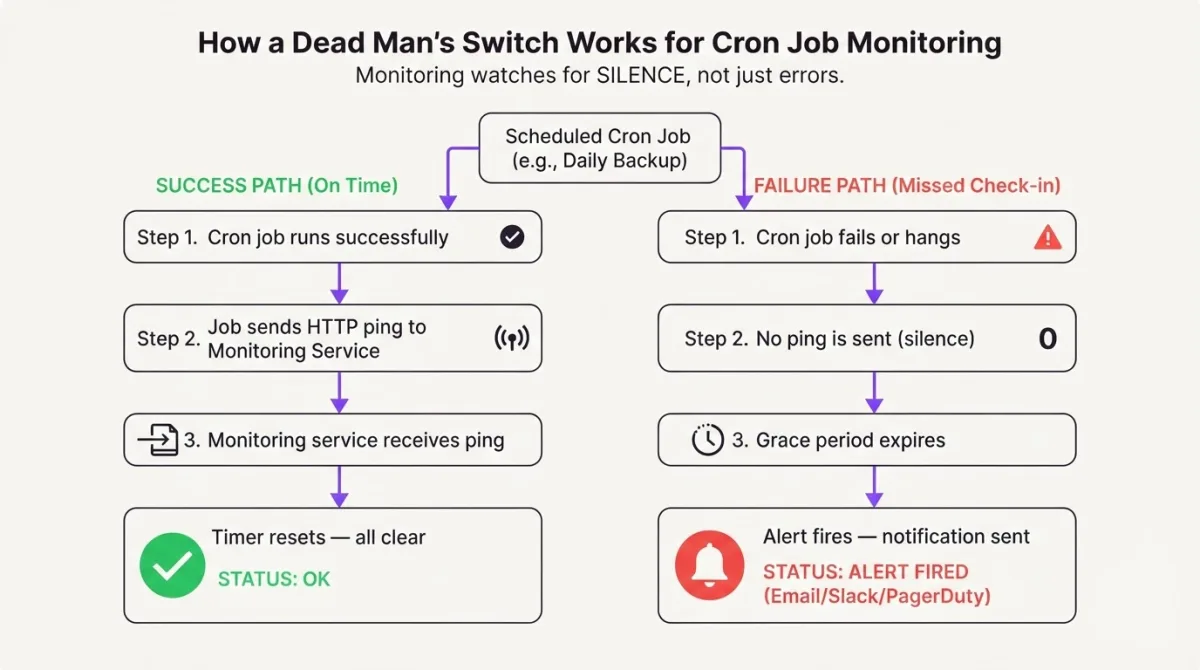
In cron monitoring, this same principle is called heartbeat monitoring. Instead of watching for errors, you watch for silence. Your cron job sends a small HTTP request (a "ping" or "heartbeat") every time it completes successfully. A monitoring service tracks these heartbeats. If the expected heartbeat doesn't arrive within a defined window, the service assumes the job is dead and sends you an alert.
This catches every failure mode I listed above. Job didn't run? No heartbeat arrives. Job ran but crashed? Still no heartbeat, assuming you only ping on success. Job is hanging? The heartbeat never comes within the expected window. Whole server offline? You get the idea.
How dead man's switch monitoring works
The implementation is almost embarrassingly simple. Here's the basic flow:
You create a monitor in a heartbeat service and get a unique URL
You add a single HTTP request to the end of your cron job script
The service expects a ping at the interval matching your cron schedule
If the ping doesn't arrive within the grace period, you get an alert via Slack, email, SMS, or whichever channel you've configured.
Let's say you have a nightly backup script. Here's what adding a heartbeat looks like in Bash:
#!/bin/bash
set -e

# Your actual backup logic
BACKUP_FILE="/backups/mydb_$(date +%Y%m%d).sql"
pg_dump mydb > "$BACKUP_FILE"
gzip "$BACKUP_FILE"

# Only ping if everything above succeeded
curl -fsS --retry 3 --max-time 10 \
  https://watchcron.com/ping/your-uuid > /dev/null
The set -e at the top makes the script exit on any error, so the curl line at the bottom only runs if everything completed without issues. The -fsS flags tell curl to fail silently on server errors but show errors on network issues. --retry 3 handles temporary network glitches. --max-time 10 prevents the ping itself from hanging.
That's it. One line of curl — one cron ping. If this line doesn't execute within the expected window (say, between 2:00 AM and 2:30 AM), you get a Slack message, email, or whatever alert channel you configured.
Heartbeat ping code examples
Curl works great for shell scripts, but if your scheduled tasks are written in Python, PHP, or Node.js, you probably want to keep the heartbeat inside the same runtime.
Python
import requests

def run_backup():
    # Your backup logic here
    dump_database()
    upload_to_s3()

def ping_heartbeat():
    try:
        requests.get(
            "https://watchcron.com/ping/your-uuid",
            timeout=10
        )
    except requests.RequestException:
        # Don't let a monitoring failure break your job
        pass

if __name__ == "__main__":
    run_backup()
    ping_heartbeat()
I always wrap the heartbeat call in a try/except. The monitoring ping should never be the reason your job fails. If WatchCron is temporarily unreachable, your backup should still complete. You'll just miss one heartbeat, and the grace period will cover it.
PHP
<?php

function runCleanup(): void
{
    // Your cleanup logic
    deleteExpiredSessions();
    purgeOldLogs();
}

function pingHeartbeat(): void
{
    try {
        $ch = curl_init('https://watchcron.com/ping/your-uuid');
        curl_setopt_array($ch, [
            CURLOPT_TIMEOUT => 10,
            CURLOPT_RETURNTRANSFER => true,
            CURLOPT_HTTPHEADER => ['User-Agent: MyCronJob/1.0'],
        ]);
        curl_exec($ch);
        curl_close($ch);
    } catch (\Throwable $e) {
        // Monitoring should never break the job
    }
}

runCleanup();
pingHeartbeat();
If you're using Laravel, there's an even cleaner way to do this with scheduled commands. I'll write a separate article on monitoring Laravel scheduled commands because it deserves its own deep dive.
Node.js
async function runSync() {
  // Your sync logic
  await syncUsersFromAPI();
  await updateLocalCache();
}

async function pingHeartbeat() {
  try {
    await fetch("https://watchcron.com/ping/your-uuid", {
      method: "GET",
      signal: AbortSignal.timeout(10000),
    });
  } catch {
    // Monitoring should never break the job
  }
}

await runSync();
await pingHeartbeat();
You get the pattern — work first, ping last, and never let a monitoring call take down your actual job.
What the grace period is for
Real cron jobs don't run at exactly the same second every time. A backup that usually takes 5 minutes might take 20 minutes if the database is larger than usual. A report generation that finishes at 3:05 AM most nights might take until 3:40 AM on month-end when there's more data.
That's where the grace period comes in. When you set up a heartbeat monitor, you define two things:
Expected schedule – when the heartbeat should arrive (e.g., every day at ~3 AM)
Grace period – how long to wait after the expected time before alerting (e.g., 30 minutes)
If your nightly backup usually pings at 3:05 AM and you set a 30-minute grace period, the service will only alert you if there's no ping by 3:30 AM. This prevents false alarms from normal runtime variance while still catching actual failures quickly.
I typically set the grace period to 2-3x the normal job duration. A job that runs for 10 minutes gets a 30-minute grace period. A job that runs for an hour gets a 3-hour grace period. You want enough slack to avoid noise, but not so much that you find out about failures hours too late.
The ping-on-failure pattern
Basic heartbeat monitoring only tells you "the job didn't complete." But sometimes you want more detail. Did the job start but fail halfway through? Did it not start at all?
A more advanced pattern uses three signals:
#!/bin/bash

# Signal: job started
curl -fsS https://watchcron.com/ping/your-uuid/start > /dev/null

# Your actual work
if pg_dump mydb > /backups/mydb.sql 2>&1; then
  # Signal: job succeeded
  curl -fsS https://watchcron.com/ping/your-uuid > /dev/null
else
  # Signal: job failed (with exit code)
  curl -fsS https://watchcron.com/ping/your-uuid/fail > /dev/null
fi
With start + success/fail signals, you can detect a new failure mode: the job that starts but never finishes. If the monitoring service receives a "start" signal but no "success" or "fail" within the grace period, it knows the job is hanging somewhere.
This is how I set up monitoring in WatchCron. You get a unique endpoint with /start, /fail, and exit code support out of the box. But the concept works with any heartbeat service.
What to actually monitor
Not every cron job needs a dead man's switch. I use a simple rule: if a silent failure of this job would cause damage that I can't easily reverse, it gets a heartbeat.
Here's what I monitor on my own servers:
Database backups – obvious. If these fail silently and I need to restore, I'm done.
SSL certificate renewal – Let's Encrypt certs expire in 90 days. If the renewal cron fails, the site goes down with a scary browser warning.
Payment webhook processing – if Paddle sends me a webhook and my queue worker is dead, customers pay but don't get access.
Cleanup jobs – disk fills up if old files aren't pruned. Less critical, but annoying to debug at 2 AM.
Data sync jobs – anything pulling from external APIs on a schedule. When a sync dies quietly, you end up with stale dashboards and confused users.
What I don't bother monitoring with heartbeats: one-off tasks, jobs where failure is immediately visible (like a broken homepage), or jobs that already have good error handling with alerts built in.
DIY vs. hosted heartbeat monitoring
The temptation to build your own dead man's switch is strong — it's genuinely not complicated. At the most basic level, you need a database table that stores the last ping time for each job, and a cron job (yes, a cron job watching your cron jobs) that checks if any pings are overdue and sends an alert.
I built a version of this early on. A simple Laravel command that ran every minute, checked timestamps, and sent Telegram messages when something was late. It worked. Until the server itself went down, and the monitoring cron went down with it.
That's the fundamental problem with self-hosted monitoring: if the server dies, the monitoring dies too. You're watching your own back with your own eyes. A separate monitoring service running on independent infrastructure is the only way to catch "the whole server is offline" scenarios.
If you want to eliminate the single-server problem entirely, Cloud Cron runs your scheduled jobs on external infrastructure — no crontab to maintain, no server dependency.
That realization is actually one of the reasons I built WatchCron as a standalone service rather than a self-hosted tool. Your monitoring has to be independent of the thing being monitored. Otherwise it's just another cron job that can fail silently.
Getting started
If you want to try heartbeat monitoring for the first time, start with your most critical cron job (probably database backups). Add one curl line to the end of the script and set up alerts to your preferred channel.
You can use WatchCron (I offer a free tier with 20 monitors, enough for most small setups), or any heartbeat monitoring service. The concept is the same everywhere.
In future posts, I'll cover more specific setups: monitoring Laravel scheduled commands, setting up heartbeats with curl and Bash, and the 5 cron failure modes that will ruin your week if you're not watching for them.
Thanks for reading. If silent cron failures have burned you before, a single heartbeat ping would have caught every one of them. These war stories are half the reason I built this.