
Not all cron job failures are the same. Some are loud: the script crashes, an error shows up in logs, and you fix it in 10 minutes. Those are the easy ones. The failures that ruin your week are the quiet ones. The job runs on schedule, exits with code 0, and everything looks fine until you discover that three weeks of backups were empty files.
I've hit each of these failure modes in production at some point. Here's what they look like, why they're hard to catch, and what actually works to detect them.
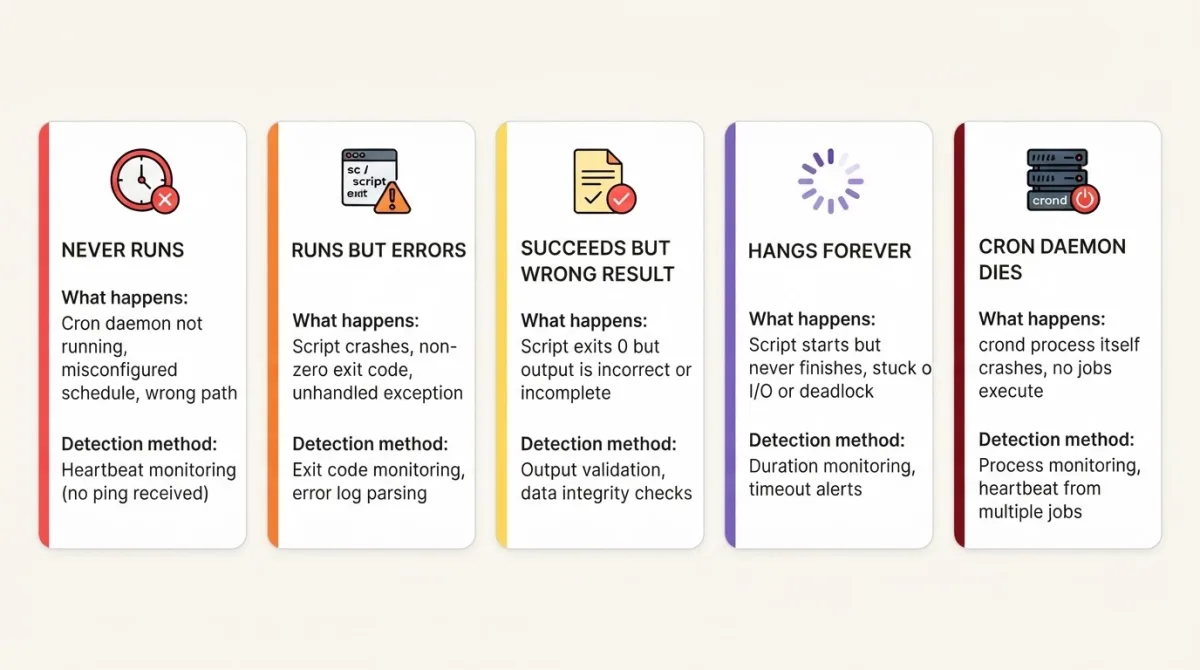
1. The job that never runs
What happens: The cron entry gets deleted, the cron daemon stops, or the server reboots and cron doesn't come back up. Your cron job is not running. No output, no error, no log entry. Nothing.
Why it's hard to catch: Most tracking watches for errors. But when a job doesn't run, there's no error to catch. There's no signal at all. You can stare at your logs for hours and find nothing, because nothing happened.
How I've hit this: I once did a server migration and forgot to copy the crontab. Everything else (the code, the database, the configs) was migrated perfectly. But crontab -l on the new server was empty. Took me four days to notice that backups had stopped.
How to catch it: This is what dead man's switch alerting is built for. Instead of watching for failures, you watch for missing success signals. Set up a heartbeat ping that your job sends on completion. If the ping doesn't arrive, you get an alert.
# The ping at the end is your proof the job ran
0 2 * * * /usr/local/bin/backup.sh && curl -fsS --retry 3 --max-time 10 https://watchcron.com/ping/your-uuid > /dev/null
For extra protection, add a scheduler heartbeat: an empty task that runs every minute just to prove the scheduler itself is alive.
2. The job that runs but exits with an error
What happens: Cron fires the job on schedule. The script starts, hits an error (database connection refused, permission denied, missing file), and exits with a non-zero code. Cron doesn't care. It moves on to the next job.
Why it's hard to catch: Cron's default behavior is to email the output to the crontab owner. In theory, you'd get an email with the error. In practice, almost nobody has a working MTA configured on their server, and even fewer people check the mailbox that cron sends to. The error goes to /var/mail/root which nobody reads.
Real example: A database password rotation broke the connection string in a backup script. The script failed with "FATAL: password authentication failed" every night for two weeks. Cron was emailing root@localhost, which nobody ever checks.
The fix: Two approaches work here. The simple one: chain the heartbeat ping with && as shown in the previous section, so it only fires on success. The better one: explicitly report the failure so you get an immediate alert instead of waiting for the grace period:
0 2 * * * /usr/local/bin/backup.sh && curl -fsS --max-time 10 https://watchcron.com/ping/your-uuid > /dev/null || curl -fsS --max-time 10 https://watchcron.com/ping/your-uuid/fail > /dev/null
Either way, redirect your job's output to a log file: >> /var/log/backup.log 2>&1 before the ping chain. When you get a failure alert, the first thing you'll want is the error message.
The || operator runs the failure ping if the script exits with a non-zero code. WatchCron treats /fail pings as immediate alerts, no waiting for the grace period.
3. The job that succeeds but does the wrong thing
What happens: The script runs, every command completes, exit code is 0. But the result is wrong. The backup file is empty. The sync imported zero records. The report was generated from stale data. The job "succeeded" by every measurable standard except the one that matters.
The trap: This is the trickiest failure mode. Exit code 0 means the process terminated normally, not that it did its job correctly. pg_dump can produce a valid (but empty) dump if the connection string points to a wrong database. rsync can "succeed" by syncing zero files. Your heartbeat ping fires, your watching shows green, and meanwhile your data is missing or corrupt.
I touched on this in the dead man's switch article. A full disk caused pg_dump to write a truncated file. The script exited 0 because the dump command itself didn't crash. It just wrote fewer bytes than expected. Three days of "successful" backups were useless.
How to catch it: Validate the output before declaring success. Add checks inside your script that verify the result:
#!/bin/bash
set -e

PING="https://watchcron.com/ping/your-uuid"
trap 'curl -fsS --max-time 10 "$PING/fail" > /dev/null' ERR

pg_dump mydb > /backups/mydb.sql
gzip /backups/mydb.sql

# Check 1: file exists
if [ ! -f /backups/mydb.sql.gz ]; then
  echo "Backup file missing"
  exit 1
fi

# Check 2: file is not suspiciously small
# Linux syntax; on macOS use: stat -f%z
FILE_SIZE=$(stat -c%s /backups/mydb.sql.gz)
if [ "$FILE_SIZE" -lt 1048576 ]; then
  echo "Backup too small: $FILE_SIZE bytes (expected >1MB)"
  exit 1
fi

# Check 3: file is a valid gzip
if ! gzip -t /backups/mydb.sql.gz 2>/dev/null; then
  echo "Backup file is corrupt"
  exit 1
fi

# All checks passed
curl -fsS --retry 3 --max-time 10 -X POST \
  --data-raw "Backup OK: $FILE_SIZE bytes" \
  "$PING" > /dev/null
Put your heartbeat ping last, after all validation. If any check fails, the trap catches it and sends a /fail signal. The success ping only fires after you've confirmed the output is correct.
You can also send diagnostic data with the ping body. When I look at my WatchCron dashboard and see "Backup OK: 47MB" every night but one night it says "Backup OK: 850KB", I know to investigate even though the check technically passed.
4. The job that hangs forever
What happens: The script starts but never finishes. It's stuck waiting for a database lock, a network response that never comes, a file lock held by another process, or an infinite loop caused by unexpected input. The job is technically "running" but not making progress.
Why it's hard to catch: From the outside, a running job looks healthy. ps aux shows it. The process is alive. It's just not doing anything useful. If you have overlap prevention (like flock), the hanging job blocks all future runs, creating a cascade of missed executions.
When this hit me: A data sync script was waiting on an API that had changed its timeout behavior. The script hung for 6 hours. The next scheduled run at the top of the hour was blocked by flock, and every subsequent run was blocked too. I had 6 hours of missed data before I noticed.
The solution: Use the start + success/fail pattern. Ping /start at the beginning and /success at the end:
#!/bin/bash

PING="https://watchcron.com/ping/your-uuid"
curl -fsS --max-time 10 "$PING/start" > /dev/null

# Your work here...
python3 /app/sync_data.py

curl -fsS --max-time 10 "$PING" > /dev/null
With /start, WatchCron knows the job began. If that start signal arrives but nothing else comes within the grace period, the job is stuck somewhere. You get an alert that says "job started but didn't complete" instead of the generic "ping missed."
For the script itself, add a timeout wrapper:
# Kill the job if it runs longer than 1 hour
timeout 3600 python3 /app/sync_data.py
The timeout command (available on most Linux systems) sends SIGTERM after the specified seconds. If the process doesn't exit, it sends SIGKILL 10 seconds later. Pair this with heartbeat tracking and you catch both the hang and the timeout.
5. The cron daemon itself dies
What happens: The cron service crashes, gets OOM-killed, or stops after a system update. Every single scheduled job stops running at once. No job produces any output because no job runs. It's complete silence.
Why this is the worst one: This is the worst failure mode because the thing responsible for running your jobs (including any watchdog jobs) is the thing that broke. If you have a cron job that checks if other cron jobs are running, that checker is also dead. It's a chicken-and-egg problem.
An Ubuntu upgrade restarted the cron service, but the restart failed due to a corrupted crontab file. systemctl status cron showed "failed" but nobody checked because, well, everything else seemed fine. All scheduled tasks were dead for almost two days.
How to catch it: You need external monitoring. Something that runs on different infrastructure and notices when pings stop arriving. That's the whole point of a heartbeat alerting service. It's independent of the server being monitored.
The pattern I use: a minimal heartbeat that runs every minute and does nothing except prove the scheduler is alive:
# Add this to crontab - the canary in the coal mine
* * * * * curl -fsS --max-time 10 https://watchcron.com/ping/uuid-scheduler-heartbeat > /dev/null
If this ping stops arriving, WatchCron alerts me within 3-5 minutes (depending on the grace period). And since WatchCron runs on its own infrastructure, it keeps checking even when my server is completely offline.
This is the single most important monitor I have. If the cron daemon is dead, all your per-job monitors will eventually alert too (as their grace periods expire), but the scheduler heartbeat catches it first and fast.
The pattern behind all five cron job failures
Every failure on this list has the same root cause: watching for errors instead of watching for success.
Traditional monitoring asks: "Did something go wrong?"
Heartbeat monitoring asks: "Did something go right?"
The first question fails when the answer is "nothing happened at all." The second question catches everything: crashes, hangs, silent exits, missing cron entries, dead daemons. If the job didn't actively report success, it's treated as a failure. No exceptions.
That's the dead man's switch principle. One curl line per job, an external service that watches for missing pings, and alerts on the channel you actually check.
Where to start
You don't need to monitor every cron job on day one. Start with the ones where a silent failure causes real damage:
Database backups – if this fails silently and you need to restore, you're in trouble.
Payment processing – customers pay but don't get access.
SSL certificate renewal – site goes down with a browser warning.
Data sync from external APIs – dashboards show stale data.
The scheduler itself – the one monitor that catches all others failing.
Five monitors cover the critical path for most setups. WatchCron's free tier gives you 20 checks with email alerts. For the full picture of what cron monitoring covers, see the cron job monitoring feature page.
For the practical how-to, start with setting up heartbeats with curl. For Laravel apps, the built-in scheduler methods are even cleaner. And for the conceptual foundation, the dead man's switch article explains why this approach works.
Silent cron failures are the kind of problem that feels impossible to prevent — until you set up the right cron monitoring. Once heartbeats are in place, they become the easiest incidents to catch.